Callback Functions in JS ft. Event Listeners
Episode 14 : Callback Functions in JS ft. Event Listeners
Section titled “Episode 14 : Callback Functions in JS ft. Event Listeners”flowchart TD Main["Main Thread(Call Stack)"]
Main --> Sync["Synchronous Codeconsole.log('x')function y()etc."]
Main --> Async["Async OperationsetTimeout(cb, 5000)"]
Async --> WebAPI["Web API EnvironmentTimer starts counting 5sCallback cb() stored"]
WebAPI -->|"After 5s"| CallbackQ["Callback Queuecb() waiting..."]
Main -->|"After GEC pops"| EventLoop["Event LoopChecks if Call Stack is empty"]
CallbackQ -->|"Stack empty? Push!"| EventLoop EventLoop -->|"cb() runs"| CallStack["Call Stackcb() executes"]
style Main fill:#7c3aed,color:#fff style Sync fill:#4f46e5,color:#fff style Async fill:#6366f1,color:#fff style WebAPI fill:#059669,color:#fff style CallbackQ fill:#d97706,color:#fff style EventLoop fill:#dc2626,color:#fff style CallStack fill:#7c3aed,color:#fffCallback Functions
Section titled “Callback Functions”- Functions are first class citizens ie. take a function A and pass it to another function B. Here, A is a callback function. So basically I am giving access to function B to call function A. This callback function gives us the access to whole Asynchronous world in Synchronous world.
setTimeout(function () { console.log("Timer");}, 1000); // first argument is callback function and second is timer.- JS is a synchronous and single threaded language. But due to callbacks, we can do async things in JS.
setTimeout(function () { console.log("timer");}, 5000);function x(y) { console.log("x"); y();}x(function y() { console.log("y");});// x y timer- In the call stack, first x and y are present. After code execution, they go away and stack is empty. Then after 5 seconds (from beginning) anonymous suddenly appear up in stack ie. setTimeout
- All 3 functions are executed through call stack. If any operation blocks the call stack, its called blocking the main thread.
- Say if x() takes 30 sec to run, then JS has to wait for it to finish as it has only 1 call stack/1 main thread. Never block main thread.
- Always use async for functions that take time eg. setTimeout
// Another Example of callbackfunction printStr(str, cb) { setTimeout(() => { console.log(str); cb(); }, Math.floor(Math.random() * 100) + 1);}function printAll() { printStr("A", () => { printStr("B", () => { printStr("C", () => {}); }); });}printAll(); // A B C // in orderEvent Listener
Section titled “Event Listener”- We will create a button in html and attach event to it.
<button id="clickMe">Click Me!</button>;
// in index.jsdocument.getElementById("clickMe").addEventListener("click", function xyz() { //when event click occurs, this callback function (xyz) is called into callstack console.log("Button clicked");});- Lets implement a increment counter button.
- Using global variable (not good as anyone can change it)
let count = 0;document.getElementById("clickMe").addEventListener("click", function xyz() {console.log("Button clicked", ++count);});
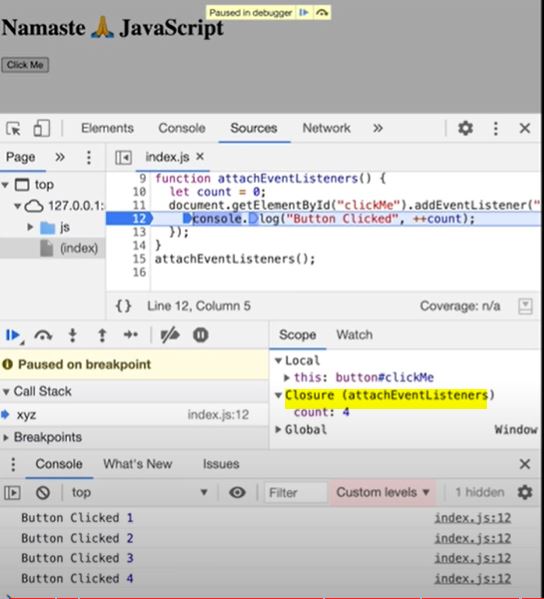
- Use closures for data abstraction
function attachEventList() {//creating new function for closurelet count = 0;document.getElementById("clickMe").addEventListener("click", function xyz() {console.log("Button clicked", ++count); //now callback function forms closure with outer scope(count)});}attachEventList();
- Using global variable (not good as anyone can change it)
Garbage Collection and removeEventListeners
Section titled “Garbage Collection and removeEventListeners”- Event listeners are heavy as they form closures. So even when call stack is empty, EventListener won’t free up memory allocated to count as it doesn’t know when it may need count again. So we remove event listeners when we don’t need them (garbage collected) onClick, onHover, onScroll all in a page can slow it down heavily.
Watch Live On Youtube below: