
1. Introduction to Angular
1. Introduction to Angular
Section titled “1. Introduction to Angular”1.1 What is Angular?
Section titled “1.1 What is Angular?”Simple Words First 🟡
Section titled “Simple Words First 🟡”Imagine you want to build a house. You could start from scratch — dig the foundation, make the bricks, mix cement. OR you could use a pre-built construction kit that gives you ready-made walls, windows, doors, and instructions on how they all connect.
Angular is that pre-built construction kit — but for building web applications.
Technical Definition
Section titled “Technical Definition”Angular is an open-source, TypeScript-based front-end web application framework developed and maintained by Google. It provides a complete solution for building large-scale, maintainable, and high-performance single-page applications (SPAs).
- Framework (not just a library): Angular gives you the full structure — routing, forms, HTTP calls, testing — all in one place.
- TypeScript-based: Angular is written in TypeScript and encourages you to write TypeScript too (more on TypeScript later).
- Component-based: Your entire UI is split into small, reusable building blocks called Components.
1.2 Why Angular Exists
Section titled “1.2 Why Angular Exists”Simple Words First 🟡
Section titled “Simple Words First 🟡”In the early days of the web, websites were simple pages. But as the web grew, developers started building complex applications (like Gmail, Google Maps, online banking) that needed to:
- Update the screen without refreshing the page
- Manage lots of user data
- Have many developers work together without stepping on each other’s code
Without a framework, this was chaos. Developers invented their own patterns, and projects became impossible to maintain.
Angular was created to bring order to that chaos.
The Core “Whys”
Section titled “The Core “Whys””| Problem Without Angular | How Angular Solves It |
|---|---|
| No standard structure | Opinionated folder structure & CLI |
| Tangled HTML + JavaScript | Component architecture separates concerns |
| DOM manipulation spaghetti | Declarative templates + data binding |
| No code reuse | Components, Services, Pipes are all reusable |
| Hard to test | Dependency injection makes testing easy |
| Team collaboration issues | Modules let teams work in isolation |
1.3 Problems Angular Solves
Section titled “1.3 Problems Angular Solves”1. DOM Manipulation Complexity
Section titled “1. DOM Manipulation Complexity”Without Angular:
// You had to manually find elements and update themdocument.getElementById('username').innerText = 'John';document.getElementById('email').innerText = 'john@email.com';// Imagine doing this for 100 fields...With Angular:
<!-- Template just "shows" data automatically --><p>{{ username }}</p><p>{{ email }}</p>Angular updates the DOM automatically when your data changes. You never touch getElementById again.
2. State Management
Section titled “2. State Management”Keeping the UI in sync with data is hard. Angular’s two-way binding ensures the UI and the data are always in sync.
3. Code Organization
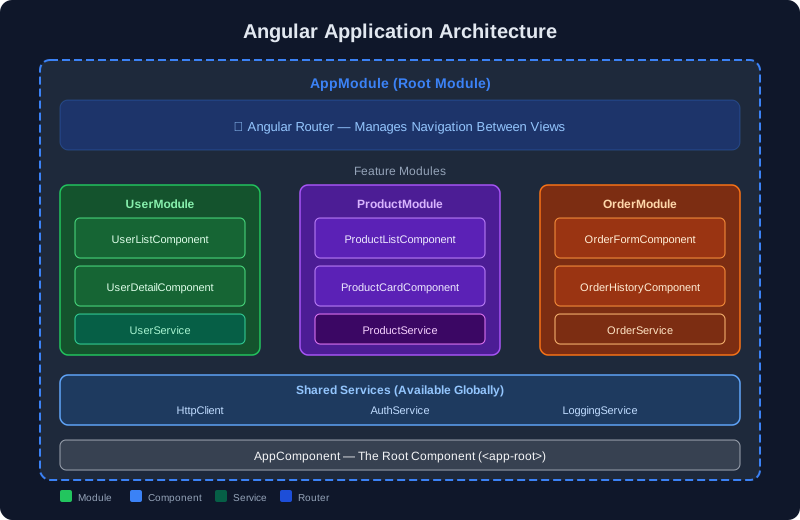
Section titled “3. Code Organization”Angular forces a structure: every feature is a Module, every UI piece is a Component, every shared logic is a Service.
4. Routing (Navigation without page reload)
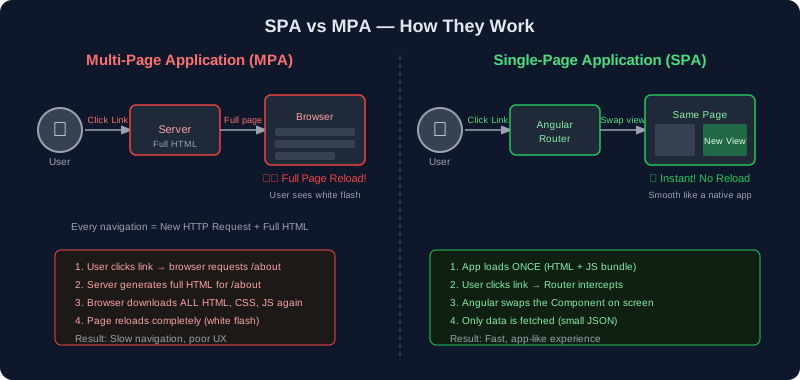
Section titled “4. Routing (Navigation without page reload)”Clicking links in a traditional website reloads the entire page. Angular’s Router navigates between “pages” without any reload — it just swaps the component on screen.
5. Forms Handling
Section titled “5. Forms Handling”Angular provides powerful form validation, real-time feedback, and easy data collection built-in.
1.4 History of Angular
Section titled “1.4 History of Angular”Timeline of Angular━━━━━━━━━━━━━━━━━━━━━━━━━━━━━━━━━━━━━━━━━━━━━━━━━━━━━━━━━━━━
2010 ──► AngularJS (Angular 1.x) released by Google • JavaScript-based • Two-way data binding was revolutionary • Used $scope for data • Became hugely popular
2016 ──► Angular 2 released (COMPLETE rewrite!) • TypeScript-based • Component-based architecture • Much faster performance • NOT backward compatible with AngularJS
2017 ──► Angular 4 (skipped version 3 to align with router version) • Smaller bundles, faster compilation
2018 ──► Angular 6, 7 • Angular CLI improvements, Angular Elements
2019 ──► Angular 8, 9 • Ivy renderer introduced (much faster)
2020 ──► Angular 10, 11 • Strict mode, better tooling
2021 ──► Angular 12, 13 • Ivy is default, View Engine removed
2022 ──► Angular 14 • Standalone components introduced
2023 ──► Angular 15, 16 • Signals (reactive state management)
2024 ──► Angular 17+ • New @if, @for block syntax • Signals are stable
━━━━━━━━━━━━━━━━━━━━━━━━━━━━━━━━━━━━━━━━━━━━━━━━━━━━━━━━━━━━Key Insight: Angular follows a 6-month release cycle. Major version numbers go up, but no more breaking changes like the AngularJS → Angular 2 jump. Each version is an incremental improvement.
1.5 AngularJS vs Angular
Section titled “1.5 AngularJS vs Angular”This is one of the most common points of confusion for beginners. Let me make it crystal clear.
Think of it this way: AngularJS and Angular are like a horse-drawn carriage vs a Tesla. Same purpose (transportation), completely different technology and design.
┌─────────────────────────────────────────────────────────────────┐│ AngularJS vs Angular Comparison │├─────────────────────┬───────────────────┬───────────────────────┤│ Feature │ AngularJS (1.x) │ Angular (2+) │├─────────────────────┼───────────────────┼───────────────────────┤│ Language │ JavaScript │ TypeScript ││ Architecture │ MVC │ Component-based ││ Data Binding │ $scope based │ @Input/@Output ││ Mobile Support │ Not great │ Mobile-first ││ Performance │ Slower (digest) │ Fast (Ivy renderer) ││ Learning Curve │ Moderate │ Steeper initially ││ SEO │ Hard │ SSR with Angular ││ DI System │ Basic │ Hierarchical, powerful││ CLI │ No official CLI │ Powerful Angular CLI ││ Maintenance │ End-of-life 2022 │ Actively maintained │└─────────────────────┴───────────────────┴───────────────────────┘Important naming convention:
- Say “AngularJS” when referring to version 1.x
- Say “Angular” when referring to version 2 and above
1.6 Angular Architecture Overview
Section titled “1.6 Angular Architecture Overview”Simple Words First 🟡
Section titled “Simple Words First 🟡”Imagine a large company building:
- The building itself is your Angular Application
- Each floor is a Module (a section of features)
- Each room is a Component (a specific UI piece)
- The intercom system is the Service (shared logic between rooms)
- The hallways are the Router (navigation between rooms)
- The electrical wiring is Dependency Injection (connecting services to components automatically)
The 5 Core Building Blocks of Angular
Section titled “The 5 Core Building Blocks of Angular”| Block | Simple Analogy | Purpose |
|---|---|---|
| Module | Floor of a building | Groups related features together |
| Component | A room | Controls a piece of the UI |
| Template | The room’s interior design | The HTML view of the component |
| Service | A utility company | Shared business logic (API calls, data) |
| Dependency Injection | Automatic service delivery | Angular delivers services to components automatically |
1.7 SPA vs MPA
Section titled “1.7 SPA vs MPA”Simple Words First 🟡
Section titled “Simple Words First 🟡”Multi-Page Application (MPA): Imagine a physical newspaper. Every time you want a different story, you have to go pick up a completely new newspaper (page reload).
Single-Page Application (SPA): Imagine a TV remote. The screen (your browser) stays the same. You press a button, and the content on screen changes instantly — no turning off and on the TV.
When to Use SPA vs MPA?
Section titled “When to Use SPA vs MPA?”| Use SPA (Angular) | Use MPA |
|---|---|
| Web apps (Gmail, dashboards) | Simple blogs/news sites |
| Apps with lots of user interaction | SEO-critical content sites |
| Rich, dynamic UIs | Sites needing fast initial load |
| Apps feeling like mobile apps | Simple brochure websites |