
API Routes and Backend
Section 10: API Routes and Backend
Section titled “Section 10: API Routes and Backend”10.1 What Are API Routes?
Section titled “10.1 What Are API Routes?”Next.js lets you build a full backend API inside your Next.js project. No separate Node.js server needed.
Analogy: Your Next.js app is a restaurant. The frontend (pages) is the dining room, and the API routes are the kitchen — handling orders (requests) and sending back food (responses).
API routes live in app/api/ and are defined as route.ts files.
10.2 Route Handlers Basics
Section titled “10.2 Route Handlers Basics”import { NextRequest, NextResponse } from "next/server";
// Handle GET requests to /api/helloexport async function GET(request: NextRequest) { return NextResponse.json({ message: "Hello from Next.js API!", timestamp: new Date().toISOString(), });}
// Handle POST requests to /api/helloexport async function POST(request: NextRequest) { const body = await request.json(); // Parse JSON body
return NextResponse.json({ received: body, success: true, }, { status: 201 }); // 201 Created}10.3 All HTTP Methods
Section titled “10.3 All HTTP Methods”import { NextRequest, NextResponse } from "next/server";
// GET /api/products/123 — Fetch single productexport async function GET( request: NextRequest, { params }: { params: { id: string } }) { const product = await db.product.findById(params.id);
if (!product) { return NextResponse.json({ error: "Product not found" }, { status: 404 }); }
return NextResponse.json(product);}
// PUT /api/products/123 — Replace entire productexport async function PUT( request: NextRequest, { params }: { params: { id: string } }) { const body = await request.json(); const updated = await db.product.replace(params.id, body); return NextResponse.json(updated);}
// PATCH /api/products/123 — Update part of productexport async function PATCH( request: NextRequest, { params }: { params: { id: string } }) { const body = await request.json(); const updated = await db.product.update(params.id, body); // Partial update return NextResponse.json(updated);}
// DELETE /api/products/123 — Delete productexport async function DELETE( request: NextRequest, { params }: { params: { id: string } }) { await db.product.delete(params.id); return NextResponse.json({ deleted: true }, { status: 200 });}10.4 API Request/Response Lifecycle
Section titled “10.4 API Request/Response Lifecycle”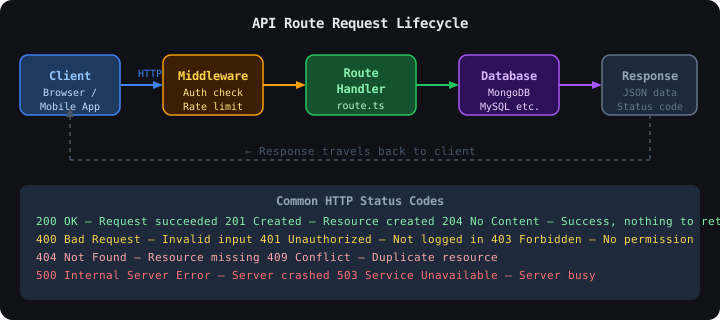
10.5 Complete CRUD API Example — Products
Section titled “10.5 Complete CRUD API Example — Products”import { NextRequest, NextResponse } from "next/server";
// Simulated database (replace with real DB)let products = [ { id: 1, name: "Laptop", price: 75000, stock: 10 }, { id: 2, name: "Phone", price: 25000, stock: 50 },];
// GET /api/products — List all productsexport async function GET(request: NextRequest) { // Support query params: /api/products?search=laptop const { searchParams } = new URL(request.url); const search = searchParams.get("search");
const filtered = search ? products.filter((p) => p.name.toLowerCase().includes(search.toLowerCase()) ) : products;
return NextResponse.json({ products: filtered, total: filtered.length });}
// POST /api/products — Create new productexport async function POST(request: NextRequest) { const body = await request.json();
// Validation if (!body.name || !body.price) { return NextResponse.json( { error: "name and price are required" }, { status: 400 } ); }
const newProduct = { id: Date.now(), name: body.name, price: body.price, stock: body.stock ?? 0, };
products.push(newProduct);
return NextResponse.json(newProduct, { status: 201 });}import { NextRequest, NextResponse } from "next/server";
// GET /api/products/1export async function GET( _req: NextRequest, { params }: { params: { id: string } }) { const id = parseInt(params.id); const product = products.find((p) => p.id === id);
if (!product) { return NextResponse.json({ error: "Product not found" }, { status: 404 }); }
return NextResponse.json(product);}
// DELETE /api/products/1export async function DELETE( _req: NextRequest, { params }: { params: { id: string } }) { const id = parseInt(params.id); const index = products.findIndex((p) => p.id === id);
if (index === -1) { return NextResponse.json({ error: "Product not found" }, { status: 404 }); }
products.splice(index, 1); return NextResponse.json({ message: "Deleted successfully" });}10.6 Authentication API
Section titled “10.6 Authentication API”import { NextRequest, NextResponse } from "next/server";import { SignJWT } from "jose"; // JWT library
const JWT_SECRET = new TextEncoder().encode(process.env.JWT_SECRET!);
export async function POST(request: NextRequest) { const { email, password } = await request.json();
// 1. Validate input if (!email || !password) { return NextResponse.json( { error: "Email and password required" }, { status: 400 } ); }
// 2. Find user (in real app: query database) const user = await findUserByEmail(email); if (!user || !(await verifyPassword(password, user.passwordHash))) { return NextResponse.json( { error: "Invalid credentials" }, { status: 401 } ); }
// 3. Create JWT token const token = await new SignJWT({ userId: user.id, email: user.email }) .setProtectedHeader({ alg: "HS256" }) .setExpirationTime("7d") .sign(JWT_SECRET);
// 4. Set HTTP-only cookie (more secure than localStorage) const response = NextResponse.json({ user: { id: user.id, name: user.name, email: user.email }, message: "Login successful", });
response.cookies.set("auth_token", token, { httpOnly: true, // JS cannot access — prevents XSS secure: process.env.NODE_ENV === "production", sameSite: "lax", maxAge: 60 * 60 * 24 * 7, // 7 days });
return response;}
// Placeholder functions — implement with bcrypt and your DBasync function findUserByEmail(email: string) { return null; // Replace with actual DB query}
async function verifyPassword(password: string, hash: string) { return false; // Replace with bcrypt.compare()}10.7 MongoDB API Integration
Section titled “10.7 MongoDB API Integration”// lib/mongodb.ts — Connection helperimport { MongoClient } from "mongodb";
const uri = process.env.MONGODB_URI!;const options = {};
let client: MongoClient;let clientPromise: Promise<MongoClient>;
if (process.env.NODE_ENV === "development") { // Reuse connection in development (hot reload creates new connections) const globalWithMongo = global as typeof globalThis & { _mongoClientPromise?: Promise<MongoClient>; };
if (!globalWithMongo._mongoClientPromise) { client = new MongoClient(uri, options); globalWithMongo._mongoClientPromise = client.connect(); } clientPromise = globalWithMongo._mongoClientPromise;} else { // Fresh connection in production client = new MongoClient(uri, options); clientPromise = client.connect();}
export default clientPromise;// app/api/users/route.ts — MongoDB CRUDimport { NextRequest, NextResponse } from "next/server";import clientPromise from "@/lib/mongodb";import { ObjectId } from "mongodb";
export async function GET() { const client = await clientPromise; const db = client.db("myapp");
const users = await db.collection("users").find({}).toArray();
return NextResponse.json(users);}
export async function POST(request: NextRequest) { const body = await request.json(); const client = await clientPromise; const db = client.db("myapp");
const result = await db.collection("users").insertOne({ ...body, createdAt: new Date(), });
return NextResponse.json( { insertedId: result.insertedId }, { status: 201 } );}10.8 MySQL API Integration
Section titled “10.8 MySQL API Integration”// lib/mysql.ts — MySQL connection poolimport mysql from "mysql2/promise";
const pool = mysql.createPool({ host: process.env.DB_HOST, user: process.env.DB_USER, password: process.env.DB_PASSWORD, database: process.env.DB_NAME, waitForConnections: true, connectionLimit: 10, queueLimit: 0,});
export default pool;// app/api/orders/route.ts — MySQL exampleimport { NextRequest, NextResponse } from "next/server";import pool from "@/lib/mysql";import { RowDataPacket } from "mysql2";
interface Order extends RowDataPacket { id: number; product_name: string; quantity: number; total_price: number;}
export async function GET() { const [rows] = await pool.execute<Order[]>( "SELECT * FROM orders ORDER BY created_at DESC LIMIT 50" ); return NextResponse.json(rows);}
export async function POST(request: NextRequest) { const { productId, quantity, userId } = await request.json();
const [result] = await pool.execute( "INSERT INTO orders (product_id, quantity, user_id, created_at) VALUES (?, ?, ?, NOW())", [productId, quantity, userId] );
return NextResponse.json({ success: true, result }, { status: 201 });}10.9 File Uploads
Section titled “10.9 File Uploads”import { NextRequest, NextResponse } from "next/server";import { writeFile } from "fs/promises";import path from "path";
export async function POST(request: NextRequest) { const formData = await request.formData(); const file = formData.get("file") as File;
if (!file) { return NextResponse.json({ error: "No file provided" }, { status: 400 }); }
// Validate file type const allowedTypes = ["image/jpeg", "image/png", "image/webp"]; if (!allowedTypes.includes(file.type)) { return NextResponse.json({ error: "Invalid file type" }, { status: 400 }); }
// Validate file size (max 5MB) if (file.size > 5 * 1024 * 1024) { return NextResponse.json({ error: "File too large (max 5MB)" }, { status: 400 }); }
const bytes = await file.arrayBuffer(); const buffer = Buffer.from(bytes);
// Save to /public/uploads const filename = `${Date.now()}-${file.name}`; const uploadPath = path.join(process.cwd(), "public", "uploads", filename); await writeFile(uploadPath, buffer);
return NextResponse.json({ url: `/uploads/${filename}`, filename, });}10.10 Middleware Integration
Section titled “10.10 Middleware Integration”// middleware.ts — runs before every requestimport { NextRequest, NextResponse } from "next/server";import { jwtVerify } from "jose";
const JWT_SECRET = new TextEncoder().encode(process.env.JWT_SECRET!);
// Protected routes patternconst protectedRoutes = ["/dashboard", "/profile", "/api/user"];
export async function middleware(request: NextRequest) { const { pathname } = request.nextUrl;
// Check if this route needs protection const isProtected = protectedRoutes.some((route) => pathname.startsWith(route) );
if (!isProtected) { return NextResponse.next(); // Allow through }
// Get token from cookie const token = request.cookies.get("auth_token")?.value;
if (!token) { // Redirect to login return NextResponse.redirect(new URL("/login", request.url)); }
try { // Verify JWT await jwtVerify(token, JWT_SECRET); return NextResponse.next(); // Allow through } catch { // Invalid token return NextResponse.redirect(new URL("/login", request.url)); }}
// Apply middleware to these pathsexport const config = { matcher: ["/dashboard/:path*", "/profile/:path*", "/api/user/:path*"],};10.11 Environment Variables
Section titled “10.11 Environment Variables”# .env.local — Never commit this file!
# DatabaseMONGODB_URI=mongodb+srv://user:password@cluster.mongodb.net/myappDB_HOST=localhostDB_USER=rootDB_PASSWORD=secretDB_NAME=myapp
# AuthenticationJWT_SECRET=your-super-secret-jwt-key-min-32-chars
# API KeysOPENAI_API_KEY=sk-...STRIPE_SECRET_KEY=sk_live_...
# Public vars (exposed to browser — safe to expose)NEXT_PUBLIC_APP_URL=https://myapp.comNEXT_PUBLIC_STRIPE_PUBLISHABLE_KEY=pk_live_...// Using env vars in API routesconst dbUri = process.env.MONGODB_URI; // Server-onlyconst appUrl = process.env.NEXT_PUBLIC_APP_URL; // Available everywhere
// ❌ Never do this in client codeconst secret = process.env.JWT_SECRET; // Undefined in browser — stays server-onlyRule: Only vars prefixed with
NEXT_PUBLIC_are available in the browser. All others are server-only.
10.12 API Validation with Zod
Section titled “10.12 API Validation with Zod”// app/api/users/route.ts — with Zod validationimport { z } from "zod";import { NextRequest, NextResponse } from "next/server";
// Define schemaconst CreateUserSchema = z.object({ name: z.string().min(2, "Name must be at least 2 characters"), email: z.string().email("Invalid email address"), age: z.number().int().min(18, "Must be 18 or older").optional(), role: z.enum(["admin", "user", "moderator"]).default("user"),});
export async function POST(request: NextRequest) { const body = await request.json();
// Validate with Zod const result = CreateUserSchema.safeParse(body);
if (!result.success) { // Return detailed validation errors return NextResponse.json( { error: "Validation failed", issues: result.error.flatten().fieldErrors, }, { status: 400 } ); }
// result.data is fully typed and validated const { name, email, role } = result.data;
// Create user in DB... return NextResponse.json({ name, email, role }, { status: 201 });}10.13 Security Best Practices
Section titled “10.13 Security Best Practices”| Practice | Implementation |
|---|---|
| Input validation | Use Zod or Joi for all inputs |
| SQL injection prevention | Parameterized queries (never string concat) |
| XSS prevention | httpOnly cookies, sanitize HTML output |
| CORS headers | Set Access-Control-Allow-Origin explicitly |
| Rate limiting | Use upstash/ratelimit or middleware |
| Secrets management | .env.local, never commit secrets |
| HTTPS only | secure: true on cookies in production |
| Authentication | Verify JWT on every protected route |
10.14 API Rate Limiting
Section titled “10.14 API Rate Limiting”// middleware.ts — Basic rate limiting with Upstash Redisimport { Ratelimit } from "@upstash/ratelimit";import { Redis } from "@upstash/redis";import { NextRequest, NextResponse } from "next/server";
const ratelimit = new Ratelimit({ redis: Redis.fromEnv(), limiter: Ratelimit.slidingWindow(10, "10 s"), // 10 requests per 10 seconds analytics: true,});
export async function middleware(request: NextRequest) { const ip = request.ip ?? "127.0.0.1"; const { success } = await ratelimit.limit(ip);
if (!success) { return NextResponse.json( { error: "Too many requests" }, { status: 429 } // 429 Too Many Requests ); }
return NextResponse.next();}10.15 Common Mistakes in API Routes
Section titled “10.15 Common Mistakes in API Routes”| ❌ Mistake | ✅ Fix |
|---|---|
| No input validation | Always validate with Zod or manual checks |
| Returning passwords in response | Never include sensitive fields |
| Hardcoding secrets | Use .env.local |
| No error handling | Wrap in try/catch, return proper status codes |
| No authentication on protected routes | Use middleware |
| Using GET for state-changing operations | GET = read, POST/PUT/DELETE = write |
| Returning 200 for errors | Use correct status codes (400, 401, 404, 500) |
10.16 Interview Questions — API Routes
Section titled “10.16 Interview Questions — API Routes”- What is a Route Handler in Next.js? How is it different from a page?
- What is
NextRequestand how is it different from the nativeRequest? - How do you read query parameters in a Route Handler?
- What is the difference between PUT and PATCH?
- How do you protect an API route with authentication?
- What is CORS and how do you handle it in Next.js?
- How do you handle file uploads in a Next.js API route?
- What is middleware in Next.js? Where does it run?
- What is the difference between
NEXT_PUBLIC_env vars and regular ones? - How would you implement rate limiting in a Next.js API?