
Testing
Section 20: Testing
Section titled “Section 20: Testing”20.1 What Is Testing?
Section titled “20.1 What Is Testing?”Testing is the practice of verifying that your application behaves as expected under various conditions. It involves writing automated code that exercises your application and asserts specific outcomes.
Simple analogy: Testing is like a pre-flight checklist for a pilot. You check each system (engine, instruments, controls) before every flight to ensure nothing is broken — even if nothing seemed wrong yesterday.
20.2 Why Testing Matters
Section titled “20.2 Why Testing Matters”| Benefit | Description |
|---|---|
| Confidence | Deploy without fear of breaking things |
| Regression prevention | Old bugs don’t come back |
| Documentation | Tests describe expected behavior |
| Refactoring safety | Change code freely with a safety net |
| Team velocity | Faster review, clearer contracts between components |
20.3 The Testing Pyramid
Section titled “20.3 The Testing Pyramid”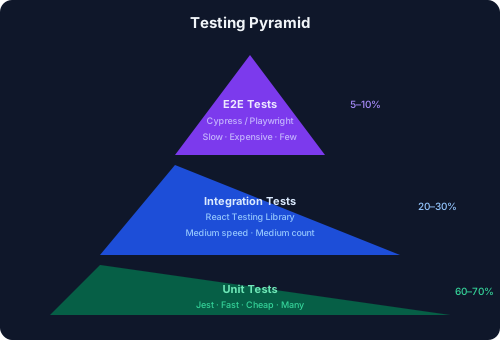
20.4 Types of Testing
Section titled “20.4 Types of Testing”Unit Testing
Section titled “Unit Testing”Tests individual functions or components in isolation.
- Fast to run
- Easy to write
- No network or database needed
Integration Testing
Section titled “Integration Testing”Tests how multiple units work together — components with context, API calls, routing.
- Slower than unit tests
- More realistic
- May require mocking
End-to-End (E2E) Testing
Section titled “End-to-End (E2E) Testing”Tests the entire application flow from the user’s perspective in a real browser.
- Slowest
- Most realistic
- Catches issues other tests miss
20.5 Testing Tools
Section titled “20.5 Testing Tools”| Tool | Type | Purpose |
|---|---|---|
| Jest | Unit / Integration | Test runner, assertions, mocking |
| React Testing Library | Integration | Render and interact with React components |
| Cypress | E2E | Browser automation, visual testing |
| Playwright | E2E | Cross-browser automation by Microsoft |
| MSW (Mock Service Worker) | Mocking | Intercept API calls in tests |
| Testing Library / user-event | Integration | Simulate real user interactions |
20.6 Setting Up Jest + React Testing Library
Section titled “20.6 Setting Up Jest + React Testing Library”# Install dependenciesnpm install -D jest jest-environment-jsdom @testing-library/react @testing-library/jest-dom @testing-library/user-event ts-jestconst nextJest = require('next/jest');
const createJestConfig = nextJest({ dir: './', // Next.js project root});
const customConfig = { setupFilesAfterFramework: ['<rootDir>/jest.setup.ts'], testEnvironment: 'jest-environment-jsdom', moduleNameMapper: { '^@/(.*)$': '<rootDir>/$1', },};
module.exports = createJestConfig(customConfig);import '@testing-library/jest-dom';20.7 Writing Tests: describe, it, expect
Section titled “20.7 Writing Tests: describe, it, expect”import { render, screen } from '@testing-library/react';import userEvent from '@testing-library/user-event';import { Button } from '@/components/Button';
// describe() groups related testsdescribe('Button Component', () => {
// it() (alias: test()) describes a single test case it('renders with correct text', () => { render(<Button>Click me</Button>);
// expect() makes an assertion expect(screen.getByRole('button', { name: /click me/i })).toBeInTheDocument(); });
it('calls onClick when clicked', async () => { const user = userEvent.setup(); const handleClick = jest.fn(); // Mock function
render(<Button onClick={handleClick}>Submit</Button>);
await user.click(screen.getByRole('button'));
// expect().toHaveBeenCalledTimes() checks mock call count expect(handleClick).toHaveBeenCalledTimes(1); });
it('is disabled when the disabled prop is true', () => { render(<Button disabled>Disabled</Button>); expect(screen.getByRole('button')).toBeDisabled(); });});20.8 Testing Async Code
Section titled “20.8 Testing Async Code”import { render, screen, waitFor } from '@testing-library/react';import { UserProfile } from '@/components/UserProfile';
// Mock the fetch globallyglobal.fetch = jest.fn();
describe('UserProfile', () => { beforeEach(() => { jest.clearAllMocks(); });
it('shows loading state initially', () => { (fetch as jest.Mock).mockResolvedValueOnce({ ok: true, json: async () => ({ name: 'Alice', email: 'alice@example.com' }), });
render(<UserProfile userId="1" />); expect(screen.getByText(/loading/i)).toBeInTheDocument(); });
it('displays user data after fetch', async () => { (fetch as jest.Mock).mockResolvedValueOnce({ ok: true, json: async () => ({ name: 'Alice', email: 'alice@example.com' }), });
render(<UserProfile userId="1" />);
// waitFor retries until assertion passes or times out await waitFor(() => { expect(screen.getByText('Alice')).toBeInTheDocument(); }); });
it('shows error when fetch fails', async () => { (fetch as jest.Mock).mockRejectedValueOnce(new Error('Network error'));
render(<UserProfile userId="1" />);
await waitFor(() => { expect(screen.getByText(/something went wrong/i)).toBeInTheDocument(); }); });});20.9 Mocking APIs with MSW
Section titled “20.9 Mocking APIs with MSW”import { http, HttpResponse } from 'msw';
export const handlers = [ http.get('/api/users/:id', ({ params }) => { return HttpResponse.json({ id: params.id, name: 'Mock User', email: 'mock@test.com', }); }),
http.post('/api/users', async ({ request }) => { const body = await request.json() as { name: string }; return HttpResponse.json({ id: '123', ...body }, { status: 201 }); }),];// jest.setup.ts (add MSW setup)import { setupServer } from 'msw/node';import { handlers } from './__mocks__/handlers';
const server = setupServer(...handlers);
beforeAll(() => server.listen());afterEach(() => server.resetHandlers());afterAll(() => server.close());20.10 Testing Forms
Section titled “20.10 Testing Forms”import { render, screen, waitFor } from '@testing-library/react';import userEvent from '@testing-library/user-event';import { LoginForm } from '@/components/LoginForm';
describe('LoginForm', () => { it('shows validation error for empty email', async () => { const user = userEvent.setup(); render(<LoginForm />);
await user.click(screen.getByRole('button', { name: /sign in/i }));
expect(await screen.findByText(/email is required/i)).toBeInTheDocument(); });
it('submits form with valid credentials', async () => { const user = userEvent.setup(); const onSubmit = jest.fn(); render(<LoginForm onSubmit={onSubmit} />);
await user.type(screen.getByLabelText(/email/i), 'user@test.com'); await user.type(screen.getByLabelText(/password/i), 'password123'); await user.click(screen.getByRole('button', { name: /sign in/i }));
await waitFor(() => { expect(onSubmit).toHaveBeenCalledWith({ email: 'user@test.com', password: 'password123', }); }); });});20.11 Testing Lifecycle Diagram
Section titled “20.11 Testing Lifecycle Diagram”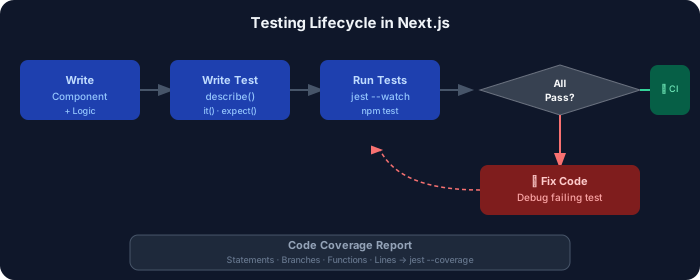
20.12 End-to-End Testing with Playwright
Section titled “20.12 End-to-End Testing with Playwright”# Install Playwrightnpm install -D @playwright/testnpx playwright installimport { defineConfig } from '@playwright/test';
export default defineConfig({ testDir: './e2e', use: { baseURL: 'http://localhost:3000', screenshot: 'only-on-failure', video: 'retain-on-failure', }, webServer: { command: 'npm run dev', url: 'http://localhost:3000', reuseExistingServer: !process.env.CI, },});import { test, expect } from '@playwright/test';
test.describe('Authentication Flow', () => { test('user can log in with valid credentials', async ({ page }) => { await page.goto('/login');
await page.fill('input[name="email"]', 'user@test.com'); await page.fill('input[name="password"]', 'password123'); await page.click('button[type="submit"]');
// Wait for redirect to dashboard await expect(page).toHaveURL('/dashboard'); await expect(page.getByText('Welcome back')).toBeVisible(); });
test('shows error for invalid credentials', async ({ page }) => { await page.goto('/login');
await page.fill('input[name="email"]', 'wrong@test.com'); await page.fill('input[name="password"]', 'wrongpassword'); await page.click('button[type="submit"]');
await expect(page.getByText('Invalid credentials')).toBeVisible(); });});20.13 Cypress vs Playwright Comparison
Section titled “20.13 Cypress vs Playwright Comparison”| Feature | Cypress | Playwright |
|---|---|---|
| Browser Support | Chrome, Firefox, Edge | Chromium, Firefox, WebKit |
| Language | JS/TS | JS/TS, Python, Java, C# |
| Speed | Moderate | Fast |
| Parallel execution | Paid plan | Built-in (free) |
| Auto-waiting | ✅ Yes | ✅ Yes |
| Network mocking | ✅ Yes | ✅ Yes |
| Mobile viewport | ✅ Yes | ✅ Yes |
| Screenshot/Video | ✅ Yes | ✅ Yes |
| Community size | Very large | Growing fast |
| API testing | Limited | Built-in |
| Best for | Traditional SPA testing | Modern cross-browser |
20.14 Unit vs Integration Testing Comparison
Section titled “20.14 Unit vs Integration Testing Comparison”| Aspect | Unit Testing | Integration Testing |
|---|---|---|
| What is tested | Single function/component | Multiple units together |
| Speed | Very fast (ms) | Moderate (seconds) |
| Isolation | Full (mocked deps) | Partial (real components) |
| Confidence level | Low-Medium | Medium-High |
| Test count | Many (hundreds) | Moderate (tens) |
| Finds bugs | Logic errors | Integration issues |
| Example | formatDate() function | Login form → API call |
20.15 Component Testing Workflow
Section titled “20.15 Component Testing Workflow”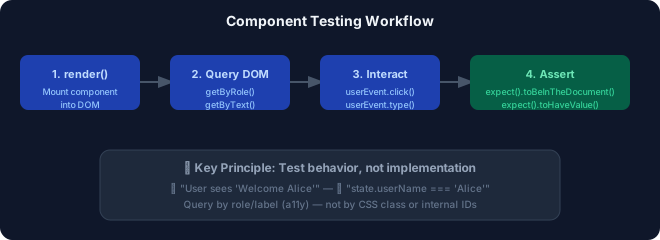
20.16 Best Practices for Testing
Section titled “20.16 Best Practices for Testing”- ✅ Follow the Testing Trophy (favoring integration tests over pure unit)
- ✅ Query by accessibility attributes (
getByRole,getByLabelText) - ✅ Avoid testing implementation details (internal state, CSS classes)
- ✅ Use
userEventoverfireEventfor realistic interactions - ✅ Mock only what you must — prefer real implementations
- ✅ Keep tests close to the code they test (
__tests__folder or.test.tsxalongside) - ✅ Run tests in CI on every push
- ✅ Aim for 70–80% coverage — 100% is usually not worth the cost
20.17 Common Mistakes in Testing
Section titled “20.17 Common Mistakes in Testing”| Mistake | Problem | Fix |
|---|---|---|
| Testing implementation details | Tests break on refactor | Test behavior visible to users |
| Not awaiting async operations | Flaky tests | Use waitFor, findBy* |
| Over-mocking | Tests don’t reflect reality | Use MSW for API mocks |
No act() around state updates | Warning floods | Use RTL which handles this |
| Testing third-party libraries | Wasted effort | Trust library authors |
| Snapshot tests everywhere | Noisy diffs, brittle | Use sparingly for stable UI |
20.18 Interview Questions — Testing
Section titled “20.18 Interview Questions — Testing”Beginner:
- What is the difference between unit, integration, and E2E testing?
- Why should you query by role instead of test ID?
- What does
jest.fn()do?
Intermediate:
4. How does Mock Service Worker (MSW) differ from mocking fetch directly?
5. What is the waitFor utility and when do you use it?
6. How would you test a form with validation in React Testing Library?
Advanced: 7. How do you handle testing of Next.js Server Components vs Client Components? 8. What strategy would you use to achieve stable, non-flaky E2E tests? 9. How do you test custom React hooks?