
Database Integration
Section 13: Database Integration
Section titled “Section 13: Database Integration”13.1 Why Do We Need Databases?
Section titled “13.1 Why Do We Need Databases?”Imagine building a blog. You write posts, users leave comments, and admins manage content. Where does all that data live? In memory? It disappears when the server restarts. In a file? It breaks under concurrent users. This is exactly why databases exist.
A database is an organized, persistent storage system optimized for:
| Need | What Databases Provide |
|---|---|
| Persistence | Data survives server restarts |
| Concurrency | Multiple users read/write safely |
| Querying | Find exactly what you need fast |
| Integrity | Rules that prevent bad data |
| Scalability | Handle millions of records |
| Security | Role-based access, encryption |
In Next.js (App Router), databases are accessed from Server Components, Route Handlers, and Server Actions — never directly from the browser (that would expose credentials).
13.2 SQL vs NoSQL — The Great Debate
Section titled “13.2 SQL vs NoSQL — The Great Debate”┌─────────────────────────────────────────────────────────────┐│ Database Types ││ ││ SQL (Relational) NoSQL (Non-Relational) ││ ┌─────────────────┐ ┌─────────────────┐ ││ │ Tables & Rows │ │ Documents/JSON │ ││ │ Fixed Schema │ │ Flexible Schema│ ││ │ Strong ACID │ │ Eventual Consist│ ││ │ JOIN queries │ │ Horizontal Scale│ ││ └─────────────────┘ └─────────────────┘ ││ Examples: Examples: ││ • PostgreSQL • MongoDB ││ • MySQL • Redis ││ • SQLite • DynamoDB │└─────────────────────────────────────────────────────────────┘Detailed Comparison
Section titled “Detailed Comparison”| Feature | SQL | NoSQL |
|---|---|---|
| Schema | Fixed, defined upfront | Flexible, can change per document |
| Relationships | JOINs between tables | Embedded docs or references |
| Scaling | Vertical (bigger server) | Horizontal (more servers) |
| ACID transactions | Full support | Varies (MongoDB supports since 4.0) |
| Query language | Standard SQL | Database-specific (MongoDB query language, etc.) |
| Best for | Banking, ERP, analytics | Social feeds, catalogs, real-time apps |
| Learning curve | Moderate | Low (JSON feels natural) |
When to Choose What
Section titled “When to Choose What”Use SQL when: Use NoSQL when:• Data is highly structured • Schema changes often• Complex relationships • Storing JSON-like documents• Financial/transactional data • High write throughput needed• Reporting & analytics • Hierarchical/nested data• Team knows SQL well • Prototyping quickly13.3 Database Architecture Basics
Section titled “13.3 Database Architecture Basics”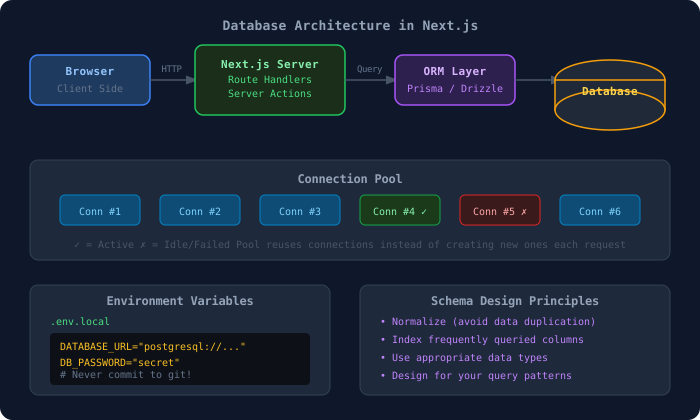
13.4 Setting Up Environment Variables
Section titled “13.4 Setting Up Environment Variables”Before connecting to any database, store credentials safely:
# .env.local (never commit this file!)DATABASE_URL="postgresql://username:password@localhost:5432/mydb"MONGODB_URI="mongodb+srv://user:pass@cluster.mongodb.net/mydb"DB_HOST="localhost"DB_PORT="5432"DB_NAME="nextjs_app"DB_USER="postgres"DB_PASSWORD="supersecret"// Access in Next.js server codeconst dbUrl = process.env.DATABASE_URL;
// With validation (recommended)if (!process.env.DATABASE_URL) { throw new Error("DATABASE_URL is not defined in environment variables");}⚠️ Critical: Add
.env.localto your.gitignore. Never expose credentials in client-side code.
13.5 MongoDB with Mongoose
Section titled “13.5 MongoDB with Mongoose”What is MongoDB?
Section titled “What is MongoDB?”MongoDB stores data as JSON-like documents (called BSON internally). Instead of rows in tables, you have documents in collections.
SQL World → MongoDB World─────────────────────────────────────────Database → DatabaseTable → CollectionRow → DocumentColumn → FieldPrimary Key → _id (auto-generated)JOIN → $lookup or embedded docsInstallation
Section titled “Installation”npm install mongoosenpm install --save-dev @types/mongoose # if neededConnection Setup
Section titled “Connection Setup”import mongoose from "mongoose";
// Global variable to cache connection (important in Next.js dev!)declare global { var mongooseConnection: { conn: typeof mongoose | null; promise: Promise<typeof mongoose> | null; };}
// Initialize global cachelet cached = global.mongooseConnection;
if (!cached) { cached = global.mongooseConnection = { conn: null, promise: null, };}
async function connectToDatabase(): Promise<typeof mongoose> { // Return existing connection if available if (cached.conn) { return cached.conn; }
// Get URI from environment const MONGODB_URI = process.env.MONGODB_URI; if (!MONGODB_URI) { throw new Error("Please define MONGODB_URI in .env.local"); }
// Create connection promise if not exists if (!cached.promise) { const opts = { bufferCommands: false, // Don't queue commands when disconnected maxPoolSize: 10, // Max 10 concurrent connections serverSelectionTimeoutMS: 5000, // Fail fast if can't connect socketTimeoutMS: 45000, // Close sockets after 45s of inactivity };
cached.promise = mongoose.connect(MONGODB_URI, opts); }
try { cached.conn = await cached.promise; } catch (e) { cached.promise = null; throw e; }
return cached.conn;}
export default connectToDatabase;Defining Models
Section titled “Defining Models”import mongoose, { Document, Model, Schema } from "mongoose";
// TypeScript interface for type safetyexport interface IUser extends Document { name: string; email: string; password: string; role: "user" | "admin"; createdAt: Date; updatedAt: Date;}
// Schema definitionconst UserSchema = new Schema<IUser>( { name: { type: String, required: [true, "Name is required"], trim: true, minlength: [2, "Name must be at least 2 characters"], maxlength: [50, "Name cannot exceed 50 characters"], }, email: { type: String, required: [true, "Email is required"], unique: true, // Creates an index lowercase: true, match: [/^\S+@\S+\.\S+$/, "Invalid email format"], }, password: { type: String, required: true, select: false, // Don't return password by default in queries minlength: 8, }, role: { type: String, enum: ["user", "admin"], default: "user", }, }, { timestamps: true, // Automatically adds createdAt and updatedAt });
// Add index for performanceUserSchema.index({ email: 1 });UserSchema.index({ createdAt: -1 });
// Prevent model recompilation in Next.js (hot reload issue)const User: Model<IUser> = mongoose.models.User || mongoose.model<IUser>("User", UserSchema);
export default User;import mongoose, { Document, Schema } from "mongoose";
export interface IProduct extends Document { name: string; description: string; price: number; category: string; stock: number; images: string[]; isActive: boolean;}
const ProductSchema = new Schema<IProduct>( { name: { type: String, required: true, trim: true }, description: { type: String, required: true }, price: { type: Number, required: true, min: 0 }, category: { type: String, required: true, index: true }, stock: { type: Number, default: 0, min: 0 }, images: [{ type: String }], isActive: { type: Boolean, default: true }, }, { timestamps: true });
// Text index for search functionalityProductSchema.index({ name: "text", description: "text" });
export default mongoose.models.Product || mongoose.model<IProduct>("Product", ProductSchema);13.6 PostgreSQL with Prisma
Section titled “13.6 PostgreSQL with Prisma”What is Prisma?
Section titled “What is Prisma?”Prisma is a next-generation ORM that gives you type-safe database access with an auto-generated query builder. It works with PostgreSQL, MySQL, SQLite, MongoDB, and more.
Without Prisma: With Prisma:───────────────────────────────────────────Raw SQL strings → Type-safe APIManual type casting → Auto-generated typesRuntime errors → Compile-time errorsWriting migrations → `prisma migrate dev`Installation & Setup
Section titled “Installation & Setup”npm install prisma @prisma/clientnpx prisma init # Creates prisma/schema.prisma and .envSchema Definition
Section titled “Schema Definition”generator client { provider = "prisma-client-js"}
datasource db { provider = "postgresql" url = env("DATABASE_URL")}
// User modelmodel User { id String @id @default(cuid()) name String email String @unique password String role Role @default(USER) posts Post[] // One-to-many relationship profile Profile? // One-to-one (optional) createdAt DateTime @default(now()) updatedAt DateTime @updatedAt
@@index([email]) @@map("users") // Table name in database}
// Profile (one-to-one with User)model Profile { id String @id @default(cuid()) bio String? avatar String? userId String @unique user User @relation(fields: [userId], references: [id], onDelete: Cascade)}
// Post modelmodel Post { id String @id @default(cuid()) title String content String published Boolean @default(false) authorId String author User @relation(fields: [authorId], references: [id]) tags Tag[] // Many-to-many comments Comment[] createdAt DateTime @default(now()) updatedAt DateTime @updatedAt
@@index([authorId]) @@index([published, createdAt(sort: Desc)])}
// Tag (many-to-many with Post)model Tag { id String @id @default(cuid()) name String @unique posts Post[]}
// Commentmodel Comment { id String @id @default(cuid()) content String postId String post Post @relation(fields: [postId], references: [id], onDelete: Cascade) authorName String createdAt DateTime @default(now())}
// Todo modelmodel Todo { id String @id @default(cuid()) title String completed Boolean @default(false) userId String dueDate DateTime? priority Priority @default(MEDIUM) createdAt DateTime @default(now())}
enum Role { USER ADMIN MODERATOR}
enum Priority { LOW MEDIUM HIGH}Prisma Client Setup (Next.js Safe)
Section titled “Prisma Client Setup (Next.js Safe)”import { PrismaClient } from "@prisma/client";
// Prevent multiple instances in Next.js dev modedeclare global { var prisma: PrismaClient | undefined;}
const prisma = global.prisma || new PrismaClient({ log: process.env.NODE_ENV === "development" ? ["query", "error", "warn"] : ["error"], });
if (process.env.NODE_ENV !== "production") { global.prisma = prisma; // Cache in development}
export default prisma;Migrations
Section titled “Migrations”# Create and apply a migrationnpx prisma migrate dev --name init
# Apply migrations in productionnpx prisma migrate deploy
# Reset database (dev only!)npx prisma migrate reset
# View database in browsernpx prisma studio
# Generate Prisma client after schema changesnpx prisma generate13.7 MySQL with Drizzle ORM
Section titled “13.7 MySQL with Drizzle ORM”What is Drizzle?
Section titled “What is Drizzle?”Drizzle is a lightweight, TypeScript-first ORM that uses a SQL-like syntax. It’s known for being fast and having zero magic — you can see exactly what SQL it generates.
npm install drizzle-orm mysql2npm install -D drizzle-kitimport { mysqlTable, varchar, int, boolean, timestamp, text,} from "drizzle-orm/mysql-core";import { relations } from "drizzle-orm";
// Users tableexport const users = mysqlTable("users", { id: int("id").primaryKey().autoincrement(), name: varchar("name", { length: 255 }).notNull(), email: varchar("email", { length: 255 }).notNull().unique(), createdAt: timestamp("created_at").defaultNow(),});
// Posts tableexport const posts = mysqlTable("posts", { id: int("id").primaryKey().autoincrement(), title: varchar("title", { length: 255 }).notNull(), content: text("content").notNull(), published: boolean("published").default(false), authorId: int("author_id").notNull(), createdAt: timestamp("created_at").defaultNow(),});
// Define relationshipsexport const usersRelations = relations(users, ({ many }) => ({ posts: many(posts),}));
export const postsRelations = relations(posts, ({ one }) => ({ author: one(users, { fields: [posts.authorId], references: [users.id], }),}));import { drizzle } from "drizzle-orm/mysql2";import mysql from "mysql2/promise";import * as schema from "./schema";
const connection = await mysql.createConnection({ host: process.env.DB_HOST, user: process.env.DB_USER, password: process.env.DB_PASSWORD, database: process.env.DB_NAME,});
export const db = drizzle(connection, { schema });13.8 CRUD Operations
Section titled “13.8 CRUD Operations”API-to-Database Flow
Section titled “API-to-Database Flow”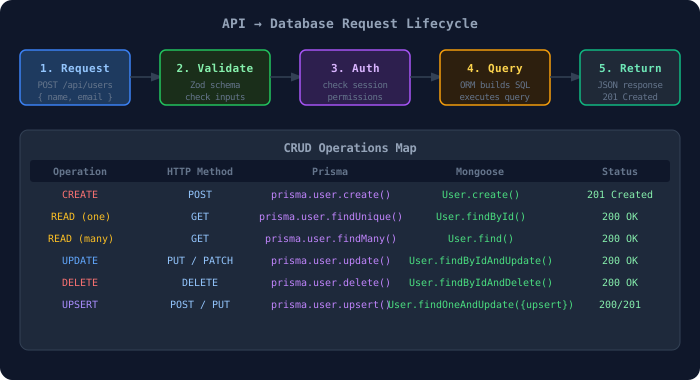
CRUD with Prisma — Practical Examples
Section titled “CRUD with Prisma — Practical Examples”import { NextRequest, NextResponse } from "next/server";import prisma from "@/lib/prisma";import { z } from "zod";
// Validation schemaconst createUserSchema = z.object({ name: z.string().min(2).max(50), email: z.string().email(), password: z.string().min(8),});
// CREATE — POST /api/usersexport async function POST(request: NextRequest) { try { const body = await request.json();
// Validate input const validated = createUserSchema.parse(body);
// Hash password (in real app, use bcrypt) // const hashedPassword = await bcrypt.hash(validated.password, 10);
// Create user in database const user = await prisma.user.create({ data: { name: validated.name, email: validated.email, password: validated.password, // use hashedPassword in production }, select: { id: true, name: true, email: true, createdAt: true, // password: false — excluded for security }, });
return NextResponse.json(user, { status: 201 }); } catch (error) { if (error instanceof z.ZodError) { return NextResponse.json( { error: "Validation failed", details: error.errors }, { status: 400 } ); } return NextResponse.json({ error: "Internal server error" }, { status: 500 }); }}
// READ ALL — GET /api/usersexport async function GET(request: NextRequest) { const { searchParams } = new URL(request.url); const page = parseInt(searchParams.get("page") || "1"); const limit = parseInt(searchParams.get("limit") || "10"); const search = searchParams.get("search") || "";
const skip = (page - 1) * limit;
const [users, total] = await prisma.$transaction([ prisma.user.findMany({ where: { OR: [ { name: { contains: search, mode: "insensitive" } }, { email: { contains: search, mode: "insensitive" } }, ], }, select: { id: true, name: true, email: true, role: true, createdAt: true }, orderBy: { createdAt: "desc" }, skip, take: limit, }), prisma.user.count({ where: { OR: [ { name: { contains: search, mode: "insensitive" } }, { email: { contains: search, mode: "insensitive" } }, ], }, }), ]);
return NextResponse.json({ users, pagination: { page, limit, total, totalPages: Math.ceil(total / limit), }, });}import { NextRequest, NextResponse } from "next/server";import prisma from "@/lib/prisma";
// READ ONE — GET /api/users/:idexport async function GET( request: NextRequest, { params }: { params: { id: string } }) { const user = await prisma.user.findUnique({ where: { id: params.id }, include: { posts: { where: { published: true }, orderBy: { createdAt: "desc" }, take: 5, // Only last 5 posts }, profile: true, }, });
if (!user) { return NextResponse.json({ error: "User not found" }, { status: 404 }); }
return NextResponse.json(user);}
// UPDATE — PATCH /api/users/:idexport async function PATCH( request: NextRequest, { params }: { params: { id: string } }) { const body = await request.json();
const user = await prisma.user.update({ where: { id: params.id }, data: body, // Only updates provided fields select: { id: true, name: true, email: true }, });
return NextResponse.json(user);}
// DELETE — DELETE /api/users/:idexport async function DELETE( request: NextRequest, { params }: { params: { id: string } }) { await prisma.user.delete({ where: { id: params.id }, });
return NextResponse.json({ message: "User deleted successfully" });}13.9 Relationships in Databases
Section titled “13.9 Relationships in Databases”Types of Relationships
Section titled “Types of Relationships”| Relationship | Example | Prisma | Mongoose |
|---|---|---|---|
| One-to-One | User → Profile | @relation + @unique | ref field |
| One-to-Many | User → Posts | Array field | ref array |
| Many-to-Many | Posts ↔ Tags | Implicit join table | Array of refs |
| Self-referential | User → Manager | self relation | Same model ref |
// Querying with relationships in Prismaconst userWithPosts = await prisma.user.findUnique({  where: { id: userId },  include: {    posts: {      include: {        tags: true,       // Include tags for each post        comments: {          take: 3,        // Only first 3 comments          orderBy: { createdAt: "desc" },        },      },    },    profile: true,  },});
// Nested create (create user and profile together)const newUser = await prisma.user.create({  data: {    name: "Alice",    email: "alice@example.com",    password: "hashed",    profile: {      create: {          // Create related profile in one query        bio: "Developer",        avatar: "https://example.com/avatar.jpg",      },    },  },  include: { profile: true },});
// Mongoose population (similar to JOIN)const user = await User.findById(userId) .populate({ path: "posts", select: "title createdAt", populate: { path: "comments", select: "content author", }, }) .lean(); // Returns plain JS object instead of Mongoose document (faster)13.10 Transactions
Section titled “13.10 Transactions”Transactions ensure multiple operations either all succeed or all fail — critical for financial or multi-step operations.
// Prisma interactive transactionconst result = await prisma.$transaction(async (tx) => {  // Deduct from sender  const sender = await tx.account.update({    where: { id: senderId },    data: { balance: { decrement: amount } },  });
  // Ensure balance doesn't go negative  if (sender.balance < 0) {    throw new Error("Insufficient funds");  // Rolls back entire transaction  }
  // Add to receiver  const receiver = await tx.account.update({    where: { id: receiverId },    data: { balance: { increment: amount } },  });
  // Log the transaction  const log = await tx.transactionLog.create({    data: {      senderId,      receiverId,      amount,      type: "TRANSFER",    },  });
  return { sender, receiver, log };});
13.11 Database Seeding
Section titled “13.11 Database Seeding”Seeding populates the database with initial or test data.
import { PrismaClient } from "@prisma/client";
const prisma = new PrismaClient();
async function main() {  console.log("🌱 Seeding database...");
  // Create admin user  const admin = await prisma.user.upsert({    where: { email: "admin@example.com" },    update: {},    create: {      name: "Admin User",      email: "admin@example.com",      password: "hashed_password",      role: "ADMIN",    },  });
  // Create sample posts  const posts = await Promise.all([    prisma.post.create({      data: {        title: "Getting Started with Next.js",        content: "Next.js is a React framework...",        published: true,        authorId: admin.id,        tags: {          connectOrCreate: [            { where: { name: "nextjs" }, create: { name: "nextjs" } },            { where: { name: "react" }, create: { name: "react" } },          ],        },      },    }),  ]);
  console.log(`✅ Seeded ${posts.length} posts`);}
main()  .catch(console.error)  .finally(() => prisma.$disconnect());
// package.json — add seed script{ "prisma": { "seed": "ts-node --compiler-options {\"module\":\"CommonJS\"} prisma/seed.ts" }}npx prisma db seed13.12 Database Optimization
Section titled “13.12 Database Optimization”Indexing Strategy
Section titled “Indexing Strategy”// In Prisma schema — add indexes for frequently queried fieldsmodel Post { id String @id title String published Boolean authorId String createdAt DateTime @default(now())
// Composite index — optimizes: findMany where published=true orderBy createdAt @@index([published, createdAt(sort: Desc)])
// Single field index @@index([authorId])
// Full-text search (PostgreSQL) @@index([title], type: BTree)}Query Optimization Tips
Section titled “Query Optimization Tips”// ❌ N+1 Problem — fetches each user's posts separatelyconst users = await prisma.user.findMany();for (const user of users) { const posts = await prisma.post.findMany({ where: { authorId: user.id } });}
// ✅ Single query with includeconst users = await prisma.user.findMany({ include: { posts: true }, // JOIN in one query});
// ✅ Select only needed fields (less data transfer)const users = await prisma.user.findMany({ select: { id: true, name: true, email: true, // Don't select password, createdAt, etc. if not needed },});
// ✅ Pagination (never fetch all records!)const posts = await prisma.post.findMany({ take: 20, skip: (page - 1) * 20, orderBy: { createdAt: "desc" },});13.13 Security Best Practices
Section titled “13.13 Security Best Practices”// ✅ Use parameterized queries (ORM handles this automatically)// Prisma is safe by default against SQL injection
// ❌ Never build raw SQL from user input// const result = await prisma.$queryRaw(`SELECT * FROM users WHERE id = ${userId}`);
// ✅ Safe raw query with parametersconst result = await prisma.$queryRaw`SELECT * FROM users WHERE id = ${userId}`;
// ✅ Sanitize and validate all input before database operationsconst safeInput = z.object({ name: z.string().max(100).trim(), email: z.string().email().toLowerCase(),}).parse(rawInput);
// ✅ Limit returned fields (never return passwords)const user = await prisma.user.findUnique({ where: { email }, select: { id: true, name: true, role: true }, // password is NOT in select — never returned});13.14 Best Practices
Section titled “13.14 Best Practices”| # | Practice | Why |
|---|---|---|
| 1 | Use a singleton Prisma/Mongoose client | Prevent connection exhaustion |
| 2 | Always use environment variables | Never hardcode credentials |
| 3 | Validate input before database calls | Prevent bad data and injection |
| 4 | Use transactions for multi-step operations | Data consistency |
| 5 | Index frequently queried columns | Query performance |
| 6 | Paginate all list queries | Prevent memory issues |
| 7 | Select only needed fields | Reduce data transfer |
| 8 | Use connection pooling | Handle concurrent requests |
| 9 | Log slow queries in development | Find performance bottlenecks |
| 10 | Run migrations in CI/CD, not application start | Prevent race conditions |
13.15 Common Mistakes
Section titled “13.15 Common Mistakes”// ❌ MISTAKE 1: Creating new PrismaClient on every requestexport async function GET() { const prisma = new PrismaClient(); // Don't do this! // ...}
// ✅ Import singleton instanceimport prisma from "@/lib/prisma";
// ❌ MISTAKE 2: Not handling database errorsconst user = await prisma.user.findUnique({ where: { id } });console.log(user.name); // Crashes if user is null!
// ✅ Check for nullif (!user) return NextResponse.json({ error: "Not found" }, { status: 404 });
// ❌ MISTAKE 3: Fetching all records without paginationconst allUsers = await prisma.user.findMany(); // Could be millions!
// ✅ Always paginateconst users = await prisma.user.findMany({ take: 20, skip: 0 });
// ❌ MISTAKE 4: Not using .lean() in Mongooseconst user = await User.findById(id); // Returns heavy Mongoose document
// ✅ Use lean for read-only operationsconst user = await User.findById(id).lean(); // Plain JS object, faster
// ❌ MISTAKE 5: Not indexing foreign keys// Querying posts by authorId without an index = full table scan13.16 Interview Questions — Database Integration
Section titled “13.16 Interview Questions — Database Integration”| Level | Question | Key Points |
|---|---|---|
| 🟢 Beginner | What is an ORM? | Abstraction over raw SQL, type safety |
| 🟢 Beginner | SQL vs NoSQL differences? | Schema, scaling, use cases |
| 🟡 Intermediate | What is connection pooling? | Reuse connections, limit overhead |
| 🟡 Intermediate | How do you prevent SQL injection? | Parameterized queries, ORMs |
| 🟡 Intermediate | Explain N+1 query problem | Loading relations one by one vs JOIN |
| 🔴 Advanced | How do database transactions work? | ACID, rollback on failure |
| 🔴 Advanced | How would you design a schema for a Twitter-like app? | Users, Tweets, Follows, Likes, indexes |
| 🔴 Advanced | Strategies for database optimization? | Indexing, caching, read replicas, sharding |