
Middleware
Section 11: Middleware
Section titled “Section 11: Middleware”What is Middleware?
Section titled “What is Middleware?”Middleware is a function that runs before a request reaches your page or API route. Think of it as a security guard at the entrance of a building — every visitor (HTTP request) must pass through the guard before entering (reaching your page).
Middleware Request Flow
Section titled “Middleware Request Flow”flowchart TB Request["🌐 Browsermakes a request"] --> Middleware["🛡️ MiddlewareRuns at the Edgebefore any route"]
Middleware --> Check{"Check request:Auth? Geo? Path?"}
Check -->|"Allow"| Route["📄 Page / API RouteNormal rendering"] Check -->|"Redirect"| Redirect["↪️ Redirect userto /login or /other"] Check -->|"Rewrite"| Rewrite["📝 Rewrite URLServe different content(URL stays same)"] Check -->|"Block"| Block["⛔ Return 401/403Block the request"]
Route --> Response["📤 Responsesent to browser"] Redirect --> Response Rewrite --> Response Block --> Response
style Request fill:#7c3aed,color:#fff style Middleware fill:#f59e0b,color:#000 style Check fill:#4f46e5,color:#fff style Route fill:#059669,color:#fff style Redirect fill:#dc2626,color:#fff style Rewrite fill:#9333ea,color:#fff style Block fill:#dc2626,color:#fff style Response fill:#059669,color:#fffIn Next.js, middleware runs at the Edge (close to the user), making it extremely fast. It can:
- Read and modify the incoming request
- Read and modify the outgoing response
- Redirect or rewrite URLs
- Set or read cookies and headers
- Block requests entirely
Browser Request │ ▼ ┌─────────────┐ │ Middleware │ ← Runs FIRST (before pages, API routes, static files) └─────────────┘ │ ▼ ┌─────────────┐ │ Next.js │ │ Page/Route │ └─────────────┘ │ ▼ Browser ResponseWhy Use Middleware?
Section titled “Why Use Middleware?”| Use Case | Without Middleware | With Middleware |
|---|---|---|
| Auth check | Repeated in every page/component | Single file, runs everywhere |
| Redirects | Requires client-side JS or server code | Instant, server-side, before render |
| A/B testing | Complex, flickers on load | Silent URL rewriting at edge |
| Geo-blocking | Server-side per route | One middleware, all routes |
| Rate limiting | Per-API-route boilerplate | Centralized |
| Logging | Scattered throughout code | One place |
Middleware Lifecycle
Section titled “Middleware Lifecycle”Every HTTP request in Next.js goes through this lifecycle:
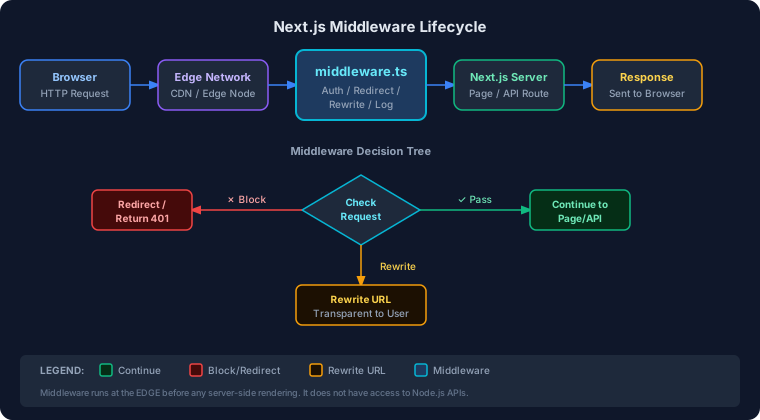
middleware.ts File
Section titled “middleware.ts File”The middleware file must be placed at the root of your project (same level as app/ or pages/), and must be named exactly middleware.ts (or middleware.js).
my-next-app/├── app/│ ├── page.tsx│ └── dashboard/│ └── page.tsx├── middleware.ts ← RIGHT HERE├── next.config.js└── package.jsonMinimal Middleware
Section titled “Minimal Middleware”import { NextResponse } from 'next/server'import type { NextRequest } from 'next/server'
// This function runs on EVERY matching requestexport function middleware(request: NextRequest) { // Just continue — do nothing special return NextResponse.next()}The config Export (Route Matching)
Section titled “The config Export (Route Matching)”By default, middleware runs on every route. You almost always want to restrict it:
export const config = { matcher: [ // Only run on these paths: '/dashboard/:path*', // /dashboard and all sub-paths '/admin/:path*', // /admin and all sub-paths '/api/protected/:path*' // Protected API routes ]}Route Matching
Section titled “Route Matching”Route matching controls which URLs trigger your middleware.
Matcher Syntax
Section titled “Matcher Syntax”| Pattern | Matches |
|---|---|
/dashboard | Exactly /dashboard |
/dashboard/:path* | /dashboard, /dashboard/stats, /dashboard/a/b |
/blog/:slug | /blog/hello, /blog/world (one segment only) |
/((?!api|_next|favicon).*) | Everything except /api, /_next, /favicon |
/admin/:path* | All admin routes |
Advanced Matcher with Exclusions
Section titled “Advanced Matcher with Exclusions”export const config = { matcher: [ /* * Match all request paths EXCEPT: * - _next/static (Next.js static files) * - _next/image (Next.js image optimization) * - favicon.ico (browser favicon) * - public folder files */ '/((?!_next/static|_next/image|favicon.ico|public).*)', ],}NextRequest & NextResponse
Section titled “NextRequest & NextResponse”These are enhanced versions of the standard Web API Request and Response objects.
NextRequest
Section titled “NextRequest”import { NextRequest, NextResponse } from 'next/server'
export function middleware(request: NextRequest) { // ─── URL Information ─────────────────────────────────── const url = request.nextUrl // Enhanced URL object const pathname = request.nextUrl.pathname // e.g. "/dashboard/stats" const origin = request.nextUrl.origin // e.g. "https://myapp.com" const searchParams = request.nextUrl.searchParams // Query string
// ─── Request Details ─────────────────────────────────── const method = request.method // "GET", "POST", etc. const headers = request.headers // Request headers
// ─── Cookies ─────────────────────────────────────────── const token = request.cookies.get('auth-token')?.value const allCookies = request.cookies.getAll()
// ─── Geo Information (Vercel only) ───────────────────── const country = request.geo?.country // "US", "IN", etc. const city = request.geo?.city // "New York" const region = request.geo?.region // "NY"
// ─── IP Address ──────────────────────────────────────── const ip = request.ip // Client IP
return NextResponse.next()}NextResponse
Section titled “NextResponse”import { NextResponse } from 'next/server'import type { NextRequest } from 'next/server'
export function middleware(request: NextRequest) { const pathname = request.nextUrl.pathname
// ─── 1. Continue (do nothing, pass request through) ─── return NextResponse.next()
// ─── 2. Redirect (browser URL changes) ──────────────── return NextResponse.redirect(new URL('/login', request.url))
// ─── 3. Rewrite (URL stays same, different page renders) ─ return NextResponse.rewrite(new URL('/home', request.url))
// ─── 4. Return a custom response (block request) ────── return new NextResponse('Forbidden', { status: 403 })
// ─── 5. Return JSON response ────────────────────────── return NextResponse.json( { error: 'Unauthorized' }, { status: 401 } )}Setting Headers and Cookies on the Response
Section titled “Setting Headers and Cookies on the Response”export function middleware(request: NextRequest) { // Clone the response to modify headers const response = NextResponse.next()
// Add a custom header to EVERY response response.headers.set('X-Custom-Header', 'my-value') response.headers.set('X-Request-ID', crypto.randomUUID())
// Set a cookie on the response response.cookies.set('visited', 'true', { httpOnly: true, secure: process.env.NODE_ENV === 'production', maxAge: 60 * 60 * 24, // 1 day path: '/', })
// Delete a cookie response.cookies.delete('old-session')
return response}Common Middleware Patterns
Section titled “Common Middleware Patterns”Authentication Middleware
Section titled “Authentication Middleware”Redirect unauthenticated users to the login page:
import { NextRequest, NextResponse } from 'next/server'
// Routes that require authenticationconst PROTECTED_ROUTES = ['/dashboard', '/profile', '/settings']
// Routes that should NOT be accessible if logged inconst AUTH_ROUTES = ['/login', '/register']
export function middleware(request: NextRequest) {  const { pathname } = request.nextUrl
  // Get auth token from cookie  const token = request.cookies.get('auth-token')?.value  const isAuthenticated = !!token // Simplified: in production, verify the token
  // If user is on an auth page but already logged in → go to dashboard  if (AUTH_ROUTES.some(route => pathname.startsWith(route)) && isAuthenticated) {    return NextResponse.redirect(new URL('/dashboard', request.url))  }
  // If user is on a protected route but NOT logged in → go to login  if (PROTECTED_ROUTES.some(route => pathname.startsWith(route)) && !isAuthenticated) {    // Save the URL they were trying to visit    const loginUrl = new URL('/login', request.url)    loginUrl.searchParams.set('callbackUrl', pathname)    return NextResponse.redirect(loginUrl)  }
  // All good — continue  return NextResponse.next()}
export const config = {  matcher: ['/dashboard/:path*', '/profile/:path*', '/settings/:path*', '/login', '/register'],}
Admin-Only Routes
Section titled “Admin-Only Routes”import { NextRequest, NextResponse } from 'next/server'
// Simple JWT payload decoder (no verification — verification in API)function getTokenPayload(token: string) { try { const base64Payload = token.split('.')[1] const payload = Buffer.from(base64Payload, 'base64').toString('utf8') return JSON.parse(payload) } catch { return null }}
export function middleware(request: NextRequest) { const { pathname } = request.nextUrl
if (pathname.startsWith('/admin')) { const token = request.cookies.get('auth-token')?.value
if (!token) { return NextResponse.redirect(new URL('/login', request.url)) }
const payload = getTokenPayload(token)
// Check role — redirect non-admins to home if (!payload || payload.role !== 'admin') { return NextResponse.redirect(new URL('/', request.url)) } }
return NextResponse.next()}
export const config = { matcher: ['/admin/:path*'],}Logging Middleware
Section titled “Logging Middleware”import { NextRequest, NextResponse } from 'next/server'
export function middleware(request: NextRequest) { const start = Date.now() const { pathname, search } = request.nextUrl const method = request.method const userAgent = request.headers.get('user-agent') ?? 'unknown'
// Log the incoming request console.log(`[${new Date().toISOString()}] → ${method} ${pathname}${search}`) console.log(` User-Agent: ${userAgent}`) console.log(` IP: ${request.ip ?? 'unknown'}`)
const response = NextResponse.next()
// Add timing header (visible in browser DevTools) response.headers.set('X-Response-Time', `${Date.now() - start}ms`)
return response}
export const config = { matcher: ['/((?!_next/static|_next/image|favicon.ico).*)'],}Analytics Middleware
Section titled “Analytics Middleware”// middleware.ts — Track page views at the edgeimport { NextRequest, NextResponse } from 'next/server'
export async function middleware(request: NextRequest) { const { pathname } = request.nextUrl
// Only track page views (not API, static, etc.) const isPageView = !pathname.startsWith('/api') && !pathname.startsWith('/_next') && !pathname.includes('.')
if (isPageView) { // Fire-and-forget analytics call (don't await — don't block the user) fetch('https://analytics.example.com/pageview', { method: 'POST', headers: { 'Content-Type': 'application/json' }, body: JSON.stringify({ path: pathname, timestamp: Date.now(), country: request.geo?.country, referrer: request.headers.get('referer'), }), }).catch(() => { // Silently ignore analytics failures — never block the user }) }
return NextResponse.next()}Security Middleware (Headers)
Section titled “Security Middleware (Headers)”// middleware.ts — Add security headers to all responsesimport { NextRequest, NextResponse } from 'next/server'
export function middleware(request: NextRequest) { const response = NextResponse.next()
// Prevent clickjacking response.headers.set('X-Frame-Options', 'DENY')
// Prevent MIME sniffing response.headers.set('X-Content-Type-Options', 'nosniff')
// Enable XSS protection in older browsers response.headers.set('X-XSS-Protection', '1; mode=block')
// Strict Transport Security (HTTPS only) response.headers.set( 'Strict-Transport-Security', 'max-age=31536000; includeSubDomains; preload' )
// Referrer policy response.headers.set('Referrer-Policy', 'strict-origin-when-cross-origin')
// Permissions policy response.headers.set( 'Permissions-Policy', 'camera=(), microphone=(), geolocation=()' )
return response}Redirecting Users (Maintenance Mode)
Section titled “Redirecting Users (Maintenance Mode)”import { NextRequest, NextResponse } from 'next/server'
const MAINTENANCE_MODE = process.env.MAINTENANCE_MODE === 'true'
export function middleware(request: NextRequest) { const { pathname } = request.nextUrl
// Don't redirect the maintenance page itself (infinite loop prevention) if (MAINTENANCE_MODE && pathname !== '/maintenance') { return NextResponse.redirect(new URL('/maintenance', request.url)) }
return NextResponse.next()}Geo-Based & Device Detection Middleware
Section titled “Geo-Based & Device Detection Middleware”Geo-Based Middleware (Vercel)
Section titled “Geo-Based Middleware (Vercel)”// middleware.ts — Serve different content based on countryimport { NextRequest, NextResponse } from 'next/server'
const BLOCKED_COUNTRIES = ['XX', 'YY'] // Example country codes
export function middleware(request: NextRequest) { const country = request.geo?.country ?? 'US' const { pathname } = request.nextUrl
// Block certain countries if (BLOCKED_COUNTRIES.includes(country)) { return new NextResponse('Service not available in your region.', { status: 451, // "Unavailable For Legal Reasons" }) }
// Redirect to country-specific content if (pathname === '/') { if (country === 'IN') { return NextResponse.rewrite(new URL('/in/home', request.url)) } if (country === 'GB') { return NextResponse.rewrite(new URL('/gb/home', request.url)) } }
return NextResponse.next()}Device Detection Middleware
Section titled “Device Detection Middleware”// middleware.ts — Detect mobile vs desktopimport { NextRequest, NextResponse } from 'next/server'
function getDeviceType(userAgent: string): 'mobile' | 'tablet' | 'desktop' { if (/Mobile|Android|iPhone/i.test(userAgent)) return 'mobile' if (/iPad|Tablet/i.test(userAgent)) return 'tablet' return 'desktop'}
export function middleware(request: NextRequest) { const userAgent = request.headers.get('user-agent') ?? '' const deviceType = getDeviceType(userAgent)
const response = NextResponse.next()
// Pass device info to pages via header response.headers.set('X-Device-Type', deviceType)
// Optionally rewrite to mobile-specific layout if (deviceType === 'mobile' && request.nextUrl.pathname === '/checkout') { return NextResponse.rewrite( new URL('/mobile/checkout', request.url) ) }
return response}Request Interception Diagram
Section titled “Request Interception Diagram”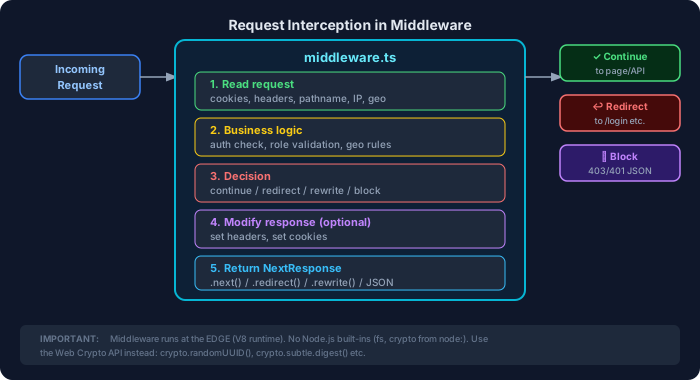
Edge Runtime & Limitations
Section titled “Edge Runtime & Limitations”What is the Edge Runtime?
Section titled “What is the Edge Runtime?”Next.js middleware runs on the Edge Runtime — a lightweight JavaScript environment (based on V8) that runs at CDN nodes around the world, very close to your users.
Traditional Server Edge Runtime───────────────── ────────────One server in one location Runs in 100+ locationsSlower (far from users) Near-instant (close to users)Full Node.js APIs available Limited APIs (no Node.js)More memory Very lightweightWhat You CANNOT Use in Middleware
Section titled “What You CANNOT Use in Middleware”| ❌ Not Available | ✅ Alternative |
|---|---|
fs (file system) | Fetch from an API instead |
path | String methods |
crypto (Node.js) | Web Crypto API (crypto.subtle) |
bcrypt | Cannot hash in middleware — do it in API routes |
| Prisma / DB connections | Too slow; use cached tokens |
| Most npm packages that use Node.js internals | Edge-compatible packages only |
Size Limit
Section titled “Size Limit”Middleware bundles must be under 1MB (typically much smaller). Heavy libraries will fail the build.
Performance Considerations
Section titled “Performance Considerations”// ❌ BAD — Database call in middleware (slow, unreliable)export async function middleware(request: NextRequest) { const userId = request.cookies.get('userId')?.value const user = await db.user.findUnique({ where: { id: userId } }) // DON'T DO THIS if (!user) return NextResponse.redirect('/login') return NextResponse.next()}
// ✅ GOOD — Verify a JWT (fast, stateless)export async function middleware(request: NextRequest) { const token = request.cookies.get('auth-token')?.value if (!token) return NextResponse.redirect(new URL('/login', request.url))
try { // Use Web Crypto or a lightweight edge-compatible library const payload = verifyJWT(token) // Fast, no DB return NextResponse.next() } catch { return NextResponse.redirect(new URL('/login', request.url)) }}Best Practices — Middleware
Section titled “Best Practices — Middleware”- Keep middleware fast — it runs on every matching request. Avoid I/O operations (database, file system).
- Use JWT or opaque cookies for auth checks — not database lookups.
- Always exclude static files from middleware matchers (
_next/static,_next/image,favicon.ico). - Use
NextResponse.redirectwith absolute URLs — always construct withnew URL('/path', request.url). - Set a
callbackUrlwhen redirecting to login so users return to their original destination. - Never trust headers from users — always validate server-side.
- Log sparingly in production — console.log in edge functions can have minor performance impact.
- Test middleware locally before deploying — use
next devand check edge behavior.
Common Mistakes — Middleware
Section titled “Common Mistakes — Middleware”- Forgetting the
config.matcher— middleware then runs on every request including_next/static, causing weird behavior. - Using Node.js APIs —
fs,path,cryptofrom Node are not available. Use Web APIs. - Database calls in middleware — breaks edge runtime and slows every request.
- Infinite redirect loops — redirecting
/loginto/login. Always checkpathname !== '/login'before redirecting. - Not handling the
callbackUrl— users get redirected to login but can’t get back to their original page. - Placing
middleware.tsinsideapp/— it must be at the project root. - Forgetting
asyncwhen usingawait(e.g., for edge-compatible crypto operations). - Relying on middleware for authorization alone — always double-check in the page/API route as well.
Interview Questions — Middleware
Section titled “Interview Questions — Middleware”Beginner:
- What is Next.js middleware, and where does it run?
- What file name and location must middleware use?
- What is the difference between
NextResponse.redirect()andNextResponse.rewrite()? - How do you restrict middleware to only certain routes?
Intermediate: 5. Why should you avoid database calls in middleware? 6. How would you implement an admin-only route using middleware? 7. What is the Edge Runtime, and how does it differ from a regular Node.js server? 8. How can you pass information from middleware to a page component? 9. How do you prevent an infinite redirect loop in middleware?
Advanced:
10. How would you implement rate limiting in Next.js middleware?
11. Explain how NextResponse.rewrite() can be used for A/B testing.
12. How do you verify a JWT in middleware without using Node.js crypto?
13. What are the bundle size constraints for middleware, and how do you stay within them?