
Introduction to Next.js
1. Introduction to Next.js
Section titled “1. Introduction to Next.js”What is Next.js?
Section titled “What is Next.js?”Next.js is a React framework built by Vercel that adds powerful features on top of React — things React alone cannot do out of the box, like server-side rendering, file-based routing, automatic code splitting, and API routes.
Analogy: If React is the engine of a car, Next.js is the full car — body, wheels, dashboard, GPS, and all. You can drive with just the engine, but the complete car is far more practical.
React → A JavaScript library for building UI componentsNext.js → A full-stack framework built on top of ReactWhy Was Next.js Created?
Section titled “Why Was Next.js Created?”React by itself is a UI library. When developers started building real-world apps with React, they ran into recurring problems:
- Pages weren’t indexed by search engines (bad SEO)
- Initial page loads were slow (blank screen until JS loaded)
- Setting up routing, API handling, and code splitting required lots of manual configuration
- No standard way to fetch data before rendering
Vercel created Next.js in 2016 to solve all these problems with a single, opinionated framework.
Problems Solved by Next.js
Section titled “Problems Solved by Next.js”| Problem | Without Next.js | With Next.js |
|---|---|---|
| SEO | Poor — content rendered client-side | Excellent — server renders HTML |
| Initial Load Speed | Slow — white screen until JS loads | Fast — HTML arrives ready |
| Routing | Manual setup with React Router | File-based, zero config |
| API Endpoints | Separate backend required | Built-in API routes |
| Code Splitting | Manual configuration | Automatic per page |
| Image Optimization | Manual | Built-in <Image> component |
| TypeScript | Manual setup | First-class support |
| Deployment | Complex | One-click on Vercel |
Benefits of Using Next.js
Section titled “Benefits of Using Next.js”- Performance — Automatic static optimization, image optimization, lazy loading
- SEO — Server-side and static rendering make pages crawlable
- Developer Experience — Fast refresh, TypeScript, ESLint all built-in
- Full-Stack — API routes let you write backend code in the same project
- Flexibility — Mix SSR, SSG, ISR, and CSR per page
- Scalability — Used by Fortune 500 companies in production
Core Features of Next.js
Section titled “Core Features of Next.js”┌─────────────────────────────────────────────┐│ NEXT.JS FEATURES │├─────────────────┬───────────────────────────┤│ App Router │ File-based routing system ││ Server Comps │ React Server Components ││ Data Fetching │ fetch() with caching ││ API Routes │ Built-in backend endpoints ││ Image Optim. │ <Image> component ││ Font Optim. │ next/font ││ Metadata API │ SEO metadata management ││ Middleware │ Edge runtime functions ││ Streaming │ Progressive rendering ││ Turbopack │ Ultra-fast bundler │└─────────────────┴───────────────────────────┘When to Use Next.js
Section titled “When to Use Next.js”✅ Use Next.js when:
- Building a website that needs good SEO (blogs, marketing, e-commerce)
- You need fast initial page loads
- You want both frontend and backend in one project
- Your team prefers React but needs more structure
- Building a SaaS product, admin dashboard, or content platform
When NOT to Use Next.js
Section titled “When NOT to Use Next.js”❌ Avoid Next.js when:
- Building a highly interactive single-page app with no SEO needs (e.g., a real-time game or internal tool)
- Your team is not familiar with React
- You need a simple static site (use Astro or plain HTML)
- You have strict self-hosting requirements with no Node.js support
Companies Using Next.js
Section titled “Companies Using Next.js”| Company | Use Case |
|---|---|
| Netflix | Content platform |
| TikTok | Web app |
| Twitch | Streaming platform |
| GitHub | Developer platform |
| Notion | Productivity tool |
| Hulu | Streaming |
| Airbnb | Marketplace |
| Target | E-commerce |
| OpenAI | AI products (ChatGPT web) |
History and Evolution
Section titled “History and Evolution”| Year | Version | Major Change |
|---|---|---|
| 2016 | v1.0 | Initial release by Vercel |
| 2018 | v7.0 | Dynamic routing |
| 2020 | v9.5 | Incremental Static Regeneration (ISR) |
| 2021 | v12 | Middleware, React 18 support |
| 2022 | v13 | App Router (beta), Server Components |
| 2023 | v13.4 | App Router stable |
| 2024 | v14 | Partial Prerendering, Server Actions stable |
| 2025 | v15 | Turbopack stable, improved caching |
React vs Next.js Comparison
Section titled “React vs Next.js Comparison”| Feature | React | Next.js |
|---|---|---|
| Type | UI Library | Full-stack Framework |
| Routing | Manual (React Router) | Built-in (file-based) |
| SSR | ❌ | ✅ |
| SSG | ❌ | ✅ |
| API Routes | ❌ | ✅ |
| SEO | Poor by default | Excellent |
| Code Splitting | Manual | Automatic |
| Image Optimization | Manual | Built-in |
| TypeScript | Manual setup | Built-in |
| Learning Curve | Lower | Moderate |
| Bundle Size | Smaller | Larger (more features) |
SPA vs SSR Comparison
Section titled “SPA vs SSR Comparison”SPA (React without Next.js)──────────────────────────Browser → Request PageBrowser ← Empty HTML (just <div id="root">)Browser → Downloads JS bundleBrowser → Renders UI in browserUser sees content (slow first load)Search bots see: empty page ❌
SSR (Next.js)─────────────Browser → Request PageServer → Builds HTML with dataBrowser ← Full HTML (instant content)User sees content immediately ✅Search bots see: full content ✅Browser → Downloads JS (hydration)SVG: Client vs Server Rendering
Section titled “SVG: Client vs Server Rendering”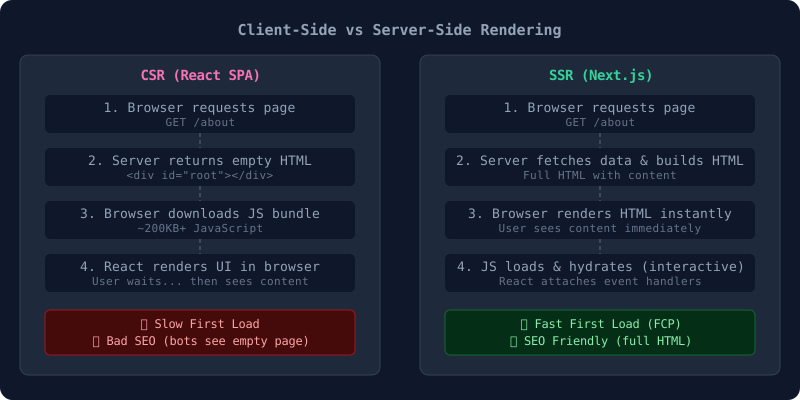
SVG: Next.js Request Lifecycle
Section titled “SVG: Next.js Request Lifecycle”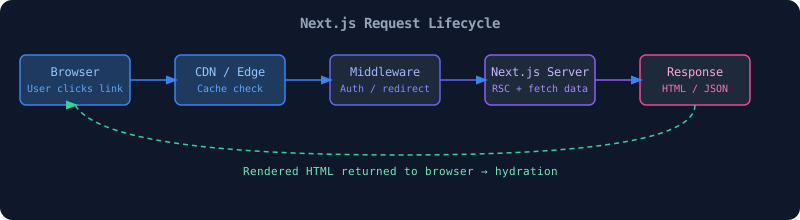
📝 Interview Questions — Section 1
Section titled “📝 Interview Questions — Section 1”Beginner:
- What is Next.js and how is it different from React?
- What does SSR stand for and why does it matter for SEO?
- Name three features of Next.js that React doesn’t have out of the box.
Intermediate: 4. What is hydration in Next.js? 5. Explain the difference between SSR, SSG, and ISR. 6. When would you choose Next.js over plain React?
Advanced: 7. How does Next.js App Router differ from Pages Router in its rendering model? 8. What is Partial Prerendering (PPR) introduced in Next.js 14? 9. Explain the trade-offs of CSR vs SSR in terms of Time to First Byte (TTFB) and Total Blocking Time (TBT).