
SEO in Next.js
Section 17: SEO in Next.js
Section titled “Section 17: SEO in Next.js”17.1 What is SEO?
Section titled “17.1 What is SEO?”SEO (Search Engine Optimization) is the practice of optimizing your website so search engines (like Google, Bing) can find it, understand it, and rank it highly in search results for relevant queries.
Think of it like this: if the internet is a massive library and your website is a book, SEO is making sure your book has a clear title, table of contents, and is in the right section — so the librarian (Google) can easily recommend it when someone asks for it.
How Search Engines Work
Section titled “How Search Engines Work”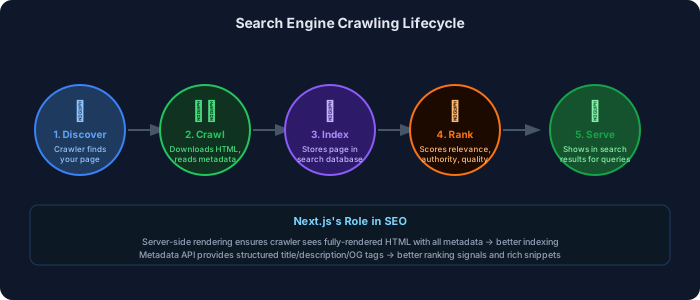
17.2 Why SEO Matters
Section titled “17.2 Why SEO Matters”| Benefit | Detail |
|---|---|
| Organic traffic | 53% of all website traffic comes from organic search |
| Trust | Users trust organic results more than ads |
| Cost-effective | Unlike ads, good rankings generate free traffic |
| Long-term ROI | Good SEO compounds over time |
| Competitive advantage | Outranking competitors = more market share |
| User experience | SEO best practices overlap with UX best practices |
17.3 SEO in SSR Applications
Section titled “17.3 SEO in SSR Applications”CSR vs SSR for SEO
Section titled “CSR vs SSR for SEO”| Aspect | CSR (React SPA) | SSR (Next.js) |
|---|---|---|
| Initial HTML | Empty <div id="root"> | Full rendered HTML |
| Crawler sees | Empty or minimal content | Complete page content |
| Metadata | May not be set correctly | Set on server, always present |
| Indexing reliability | Inconsistent (JS must execute) | Reliable (HTML ready) |
| Time to index | Slower (crawler waits for JS) | Faster (instant HTML) |
| Dynamic content | Crawler may miss JS-rendered text | Always indexed |
| Recommendation | ❌ Poor for SEO | ✅ Excellent for SEO |
17.4 Metadata API
Section titled “17.4 Metadata API”Next.js App Router provides a powerful Metadata API that replaces the old <Head> component.
Static Metadata
Section titled “Static Metadata”import type { Metadata } from 'next';
// Static metadata — known at build timeexport const metadata: Metadata = { // Basic metadata title: { default: 'My Awesome App', // used when no page title template: '%s | My Awesome App', // %s = page title, appended with site name }, description: 'The best app for managing your tasks efficiently.',
// Application info applicationName: 'My Awesome App', authors: [{ name: 'Jane Doe', url: 'https://janedoe.com' }], generator: 'Next.js', keywords: ['task management', 'productivity', 'todo app'], referrer: 'origin-when-cross-origin',
// Icons icons: { icon: '/favicon.ico', shortcut: '/favicon-16x16.png', apple: '/apple-touch-icon.png', },
// Manifest manifest: '/site.webmanifest',
// Open Graph (social sharing) openGraph: { type: 'website', locale: 'en_US', url: 'https://myapp.com', siteName: 'My Awesome App', title: 'My Awesome App — Task Management', description: 'The best app for managing your tasks.', images: [ { url: 'https://myapp.com/og-image.png', width: 1200, height: 630, alt: 'My Awesome App preview', }, ], },
// Twitter/X cards twitter: { card: 'summary_large_image', site: '@myawesomeapp', creator: '@janedoe', title: 'My Awesome App', description: 'The best task management app.', images: ['https://myapp.com/twitter-card.png'], },
// Robots directives robots: { index: true, follow: true, nocache: false, googleBot: { index: true, follow: true, noimageindex: false, 'max-video-preview': -1, 'max-image-preview': 'large', 'max-snippet': -1, }, },
// Canonical URL alternates: { canonical: 'https://myapp.com', languages: { 'en-US': 'https://myapp.com/en', 'es-ES': 'https://myapp.com/es', }, },
// Verification verification: { google: 'your-google-verification-code', yandex: 'your-yandex-code', },};
export default function RootLayout({ children }: { children: React.ReactNode }) { return ( <html lang="en"> <body>{children}</body> </html> );}17.5 Dynamic Metadata
Section titled “17.5 Dynamic Metadata”generateMetadata() is used when metadata depends on data fetched at runtime (e.g., product name, blog title).
import type { Metadata, ResolvingMetadata } from 'next';
interface Props {  params: { slug: string };  searchParams: { [key: string]: string | string[] | undefined };}
// Fetch blog post data (shared with page component via cache())import { cache } from 'react';const getPost = cache(async (slug: string) => {  const res = await fetch(`https://api.example.com/posts/${slug}`, {    next: { revalidate: 3600 }, // revalidate every hour  });  if (!res.ok) return null;  return res.json();});
// Dynamic metadata generationexport async function generateMetadata(  { params }: Props,  parent: ResolvingMetadata // access parent metadata if needed): Promise<Metadata> {  const post = await getPost(params.slug);
  if (!post) {    return {      title: 'Post Not Found',      description: 'The requested blog post could not be found.',    };  }
  // Access parent metadata (e.g., site name from layout)  const previousImages = (await parent).openGraph?.images || [];
  return {    title: post.title,                  // → "My Post Title | My Awesome App"    description: post.excerpt,
    // Authors from post data    authors: [{ name: post.author.name }],
    // Publication date    other: {      'article:published_time': post.publishedAt,      'article:modified_time': post.updatedAt,    },
    openGraph: {      type: 'article',      title: post.title,      description: post.excerpt,      url: `https://myapp.com/blog/${params.slug}`,      publishedTime: post.publishedAt,      authors: [post.author.name],      images: [        {          url: post.coverImage || 'https://myapp.com/og-default.png',          width: 1200,          height: 630,          alt: post.title,        },        ...previousImages, // include parent images as fallback      ],    },
    twitter: {      card: 'summary_large_image',      title: post.title,      description: post.excerpt,      images: [post.coverImage || 'https://myapp.com/twitter-default.png'],    },
    alternates: {      canonical: `https://myapp.com/blog/${params.slug}`,    },  };}
export default async function BlogPostPage({ params }: Props) {  const post = await getPost(params.slug); // uses cache() — no duplicate fetch  // ...}
Static vs Dynamic Metadata
Section titled “Static vs Dynamic Metadata”| Feature | Static (export const metadata) | Dynamic (generateMetadata()) |
|---|---|---|
| When evaluated | Build time | Request time |
| Can fetch data | No | Yes |
| Performance | Faster (pre-rendered) | Slightly slower |
| Use case | Layout, static pages | Product pages, blog posts |
| Supports params | No | Yes |
| TypeScript support | Yes | Yes |
17.6 OpenGraph & Social Tags
Section titled “17.6 OpenGraph & Social Tags”OpenGraph tags control how your pages appear when shared on social media (Facebook, LinkedIn, WhatsApp). Twitter Cards control appearance on Twitter/X.
Metadata Flow Diagram
Section titled “Metadata Flow Diagram”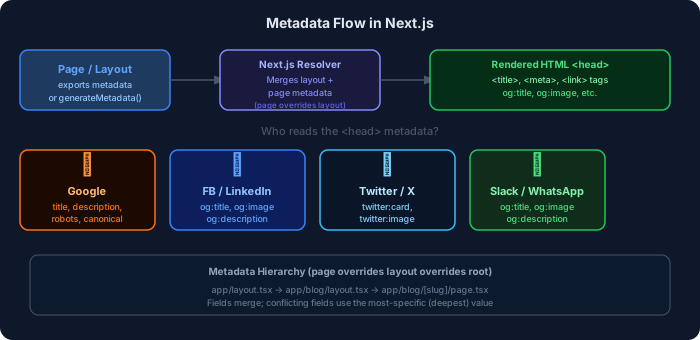
OG Image Generation with ImageResponse
Section titled “OG Image Generation with ImageResponse”import { ImageResponse } from 'next/og';
export const runtime = 'edge';export const alt = 'Blog post cover';export const size = { width: 1200, height: 630 };export const contentType = 'image/png';
export default async function Image({ params }: { params: { slug: string } }) { const post = await fetch(`https://api.example.com/posts/${params.slug}`) .then((r) => r.json());
return new ImageResponse( ( <div style={{ background: 'linear-gradient(135deg, #1e3a8a 0%, #312e81 100%)', width: '100%', height: '100%', display: 'flex', flexDirection: 'column', alignItems: 'flex-start', justifyContent: 'flex-end', padding: '60px', }} > <p style={{ color: '#93c5fd', fontSize: 28, margin: '0 0 12px' }}> My Awesome Blog </p> <h1 style={{ color: 'white', fontSize: 64, fontWeight: 700, margin: 0 }}> {post.title} </h1> <p style={{ color: '#94a3b8', fontSize: 28, marginTop: 16 }}> {post.author.name} · {new Date(post.publishedAt).toLocaleDateString()} </p> </div> ), { ...size } );}// This generates a dynamic OG image for every blog post// Accessible at: /blog/[slug]/opengraph-image17.7 Sitemap & robots.txt
Section titled “17.7 Sitemap & robots.txt”Generating a Sitemap
Section titled “Generating a Sitemap”import { MetadataRoute } from 'next';
// Returns a programmatically generated sitemapexport default async function sitemap(): Promise<MetadataRoute.Sitemap> { const baseUrl = 'https://myapp.com';
// Fetch dynamic pages (blog posts, products) const posts = await fetch(`${baseUrl}/api/posts`).then((r) => r.json()); const products = await fetch(`${baseUrl}/api/products`).then((r) => r.json());
// Static routes const staticRoutes: MetadataRoute.Sitemap = [ { url: baseUrl, lastModified: new Date(), changeFrequency: 'yearly', priority: 1, }, { url: `${baseUrl}/about`, lastModified: new Date(), changeFrequency: 'monthly', priority: 0.8, }, { url: `${baseUrl}/blog`, lastModified: new Date(), changeFrequency: 'weekly', priority: 0.9, }, ];
// Dynamic blog post routes const blogRoutes: MetadataRoute.Sitemap = posts.map((post: any) => ({ url: `${baseUrl}/blog/${post.slug}`, lastModified: new Date(post.updatedAt), changeFrequency: 'monthly' as const, priority: 0.7, }));
// Dynamic product routes const productRoutes: MetadataRoute.Sitemap = products.map((product: any) => ({ url: `${baseUrl}/products/${product.id}`, lastModified: new Date(product.updatedAt), changeFrequency: 'weekly' as const, priority: 0.8, }));
return [...staticRoutes, ...blogRoutes, ...productRoutes];}// Generates: https://myapp.com/sitemap.xmlrobots.txt
Section titled “robots.txt”import { MetadataRoute } from 'next';
export default function robots(): MetadataRoute.Robots { return { rules: [ { userAgent: '*', // applies to all crawlers allow: '/', // allow everything disallow: [ '/api/', // don't crawl API routes '/admin/', // don't crawl admin panel '/private/', // don't crawl private pages '/_next/', // Next.js internal files ], }, { userAgent: 'Googlebot', // specific rules for Googlebot allow: '/', disallow: '/admin/', }, ], sitemap: 'https://myapp.com/sitemap.xml', // tell crawlers where sitemap is host: 'https://myapp.com', // canonical host };}// Generates: https://myapp.com/robots.txtCanonical URLs
Section titled “Canonical URLs”Canonical URLs tell search engines which URL is the “official” version of a page (to prevent duplicate content penalties).
export async function generateMetadata({ params }: { params: { id: string } }) { const product = await getProduct(params.id); return { // Canonical URL — even if page is accessible via multiple URLs alternates: { canonical: `https://myapp.com/products/${params.id}`, // For multi-language sites: languages: { 'en-US': `https://myapp.com/en/products/${params.id}`, 'fr-FR': `https://myapp.fr/fr/products/${params.id}`, }, }, };}17.8 Structured Data & JSON-LD
Section titled “17.8 Structured Data & JSON-LD”Structured data (JSON-LD) is a way to tell search engines explicitly what type of content your page contains. It can unlock rich snippets in search results — like star ratings, prices, FAQ dropdowns, and recipe details.
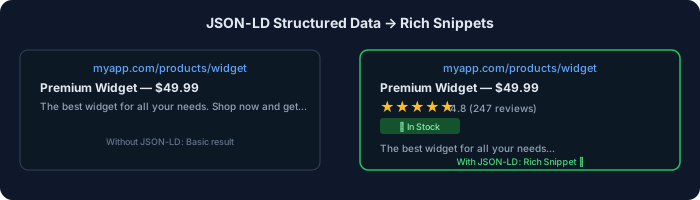
interface Product {  id: string;  name: string;  description: string;  price: number;  currency: string;  image: string;  rating: number;  reviewCount: number;  inStock: boolean;  brand: string;  sku: string;}
// JSON-LD for a Product pagefunction ProductJsonLd({ product }: { product: Product }) {  const jsonLd = {    '@context': 'https://schema.org',    '@type': 'Product',    name: product.name,    description: product.description,    image: product.image,    sku: product.sku,    brand: {      '@type': 'Brand',      name: product.brand,    },    offers: {      '@type': 'Offer',      price: product.price,      priceCurrency: product.currency,      availability: product.inStock        ? 'https://schema.org/InStock'        : 'https://schema.org/OutOfStock',      url: `https://myapp.com/products/${product.id}`,    },    aggregateRating: {      '@type': 'AggregateRating',      ratingValue: product.rating,      reviewCount: product.reviewCount,    },  };
  return (    <script      type="application/ld+json"      dangerouslySetInnerHTML={{ __html: JSON.stringify(jsonLd) }}    />  );}
export default async function ProductPage({ params }: { params: { id: string } }) {  const product = await getProduct(params.id);  return (    <>      <ProductJsonLd product={product} />      <main>        {/* Page content */}      </main>    </>  );}
// app/blog/[slug]/page.tsx — Blog post JSON-LDfunction BlogJsonLd({ post }: { post: any }) { return ( <script type="application/ld+json" dangerouslySetInnerHTML={{ __html: JSON.stringify({ '@context': 'https://schema.org', '@type': 'BlogPosting', headline: post.title, description: post.excerpt, image: post.coverImage, author: { '@type': 'Person', name: post.author.name, url: post.author.profileUrl, }, publisher: { '@type': 'Organization', name: 'My Awesome Blog', logo: { '@type': 'ImageObject', url: 'https://myapp.com/logo.png' }, }, datePublished: post.publishedAt, dateModified: post.updatedAt, mainEntityOfPage: { '@type': 'WebPage', '@id': `https://myapp.com/blog/${post.slug}`, }, }), }} /> );}// app/faq/page.tsx — FAQ JSON-LD (enables accordion in search results)function FaqJsonLd({ faqs }: { faqs: { question: string; answer: string }[] }) { return ( <script type="application/ld+json" dangerouslySetInnerHTML={{ __html: JSON.stringify({ '@context': 'https://schema.org', '@type': 'FAQPage', mainEntity: faqs.map((faq) => ({ '@type': 'Question', name: faq.question, acceptedAnswer: { '@type': 'Answer', text: faq.answer, }, })), }), }} /> );}17.9 Practical SEO Examples
Section titled “17.9 Practical SEO Examples”Blog SEO — Complete Setup
Section titled “Blog SEO — Complete Setup”// app/blog/[slug]/page.tsx — Full blog post SEOimport type { Metadata } from 'next';import { notFound } from 'next/navigation';import Image from 'next/image';import { cache } from 'react';
const getPost = cache(async (slug: string) => { const res = await fetch(`https://api.example.com/posts/${slug}`, { next: { tags: [`post-${slug}`] }, }); if (!res.ok) return null; return res.json();});
// Dynamic metadataexport async function generateMetadata({ params }: { params: { slug: string } }): Promise<Metadata> { const post = await getPost(params.slug); if (!post) return { title: 'Post Not Found' };
return { title: post.title, // "How to Build Next.js Apps | My Blog" description: post.excerpt, // 150-160 chars, compelling summary keywords: post.tags, // ['nextjs', 'react', 'typescript'] authors: [{ name: post.author.name }],
openGraph: { type: 'article', title: post.title, description: post.excerpt, url: `https://myblog.com/blog/${params.slug}`, images: [{ url: post.coverImage, width: 1200, height: 630, alt: post.title }], publishedTime: post.publishedAt, tags: post.tags, },
twitter: { card: 'summary_large_image', title: post.title, description: post.excerpt, images: [post.coverImage], },
alternates: { canonical: `https://myblog.com/blog/${params.slug}`, }, };}
// Pre-generate static pages for all postsexport async function generateStaticParams() { const posts = await fetch('https://api.example.com/posts').then(r => r.json()); return posts.map((p: any) => ({ slug: p.slug }));}
export default async function BlogPostPage({ params }: { params: { slug: string } }) { const post = await getPost(params.slug); if (!post) notFound();
return ( <article itemScope itemType="https://schema.org/BlogPosting"> {/* JSON-LD structured data */} <script type="application/ld+json" dangerouslySetInnerHTML={{ __html: JSON.stringify({ '@context': 'https://schema.org', '@type': 'BlogPosting', headline: post.title, datePublished: post.publishedAt, author: { '@type': 'Person', name: post.author.name }, }), }} />
{/* Semantic HTML for SEO */} <header> <h1 itemProp="headline">{post.title}</h1> <time dateTime={post.publishedAt} itemProp="datePublished"> {new Date(post.publishedAt).toLocaleDateString()} </time> <span itemProp="author">{post.author.name}</span> </header>
<Image src={post.coverImage} alt={post.title} width={1200} height={630} priority itemProp="image" />
<div itemProp="articleBody" dangerouslySetInnerHTML={{ __html: post.htmlContent }} /> </article> );}Product Page SEO
Section titled “Product Page SEO”export async function generateMetadata({ params }: { params: { id: string } }): Promise<Metadata> { const product = await getProduct(params.id);
// Descriptive title with key info const title = `${product.name} — ${product.brand} | ${product.category}`; // Meta description with price (eye-catching in search results) const description = `Buy ${product.name} for $${product.price}. ${product.shortDescription}. Free shipping on orders over $50.`;
return { title, description, openGraph: { type: 'website', // use 'product' with og:price extensions for e-commerce title: product.name, description, images: product.images.slice(0, 4).map((img: string) => ({ url: img, width: 800, height: 800, })), }, alternates: { canonical: `https://mystore.com/products/${params.id}`, }, };}Landing Page SEO
Section titled “Landing Page SEO”// app/page.tsx — Homepage/Landing Pageexport const metadata: Metadata = { title: 'My App — Best Task Management for Teams', // ~60 chars max description: 'Manage tasks, track progress, and collaborate with your team. Join 10,000+ teams using My App. Free plan available.', // ↑ 150-160 chars, includes: value prop, social proof, CTA hint
openGraph: { type: 'website', title: 'My App — Best Task Management for Teams', description: 'Manage tasks, track progress, and collaborate with your team.', url: 'https://myapp.com', images: [ { url: 'https://myapp.com/og-homepage.png', // 1200x630px, branded width: 1200, height: 630, alt: 'My App dashboard screenshot', }, ], },
// Organization structured data for knowledge panel other: { 'application/ld+json': JSON.stringify({ '@context': 'https://schema.org', '@type': 'Organization', name: 'My App Inc.', url: 'https://myapp.com', logo: 'https://myapp.com/logo.png', sameAs: [ 'https://twitter.com/myapp', 'https://linkedin.com/company/myapp', ], }), },};17.10 SEO Debugging
Section titled “17.10 SEO Debugging”Tools for SEO Testing
Section titled “Tools for SEO Testing”| Tool | Purpose | URL |
|---|---|---|
| Google Search Console | Monitor indexing, coverage, Core Web Vitals | search.google.com/search-console |
| Rich Results Test | Validate structured data / JSON-LD | search.google.com/test/rich-results |
| Google PageSpeed Insights | Performance + SEO scores | pagespeed.web.dev |
| Open Graph Debugger | Preview Facebook/LinkedIn sharing | developers.facebook.com/tools/debug |
| Twitter Card Validator | Preview Twitter card | cards-dev.twitter.com/validator |
| Screaming Frog | Crawl and audit your site | screamingfrog.co.uk |
| Ahrefs/SEMrush | Keyword ranking, backlinks | External subscription |
Checking Metadata in Browser DevTools
Section titled “Checking Metadata in Browser DevTools”# Check if metadata is in HTML source (not JS-rendered)1. Right-click page → "View Page Source" (not "Inspect")2. Ctrl+F to search for: - <title> - <meta name="description" - <meta property="og: - <script type="application/ld+json"
# If you see it in source → great, it's server-rendered (SEO-friendly)# If you don't see it → it's client-rendered (SEO problem)Rich Snippets Validation
Section titled “Rich Snippets Validation”// Validate your JSON-LD at: https://search.google.com/test/rich-results// Or programmatically test structure:
export async function GET() { const exampleProduct = { '@context': 'https://schema.org', '@type': 'Product', name: 'Test Product', offers: { '@type': 'Offer', price: '29.99', priceCurrency: 'USD', availability: 'https://schema.org/InStock', }, };
return Response.json({ schema: exampleProduct });}17.11 Best Practices & Common Mistakes
Section titled “17.11 Best Practices & Common Mistakes”✅ SEO Best Practices
Section titled “✅ SEO Best Practices”- Every page needs a unique title — 50-60 characters, most important keyword near the start
- Write compelling meta descriptions — 150-160 characters, include a call to action
- Use semantic HTML —
<h1>,<article>,<nav>,<main>help crawlers understand structure - One
<h1>per page — matches the page topic and title - All images need descriptive
alttext — both for SEO and accessibility - Add JSON-LD for rich content — products, articles, FAQs, recipes
- Generate sitemap.xml — helps crawlers discover all pages
- Set canonical URLs — especially for paginated or filtered pages
- Ensure mobile-friendliness — Google uses mobile-first indexing
- Page speed is a ranking factor — optimize Core Web Vitals
❌ Common SEO Mistakes
Section titled “❌ Common SEO Mistakes”- Using CSR for SEO-critical pages — search bots may not execute JavaScript
- Duplicate titles across pages — confuses crawlers about page hierarchy
- Missing
altattributes on images — loses image search traffic - Keyword stuffing in metadata — penalized by modern algorithms
- No sitemap or broken sitemap — pages may never be discovered
- Blocking important pages in robots.txt — accidentally hiding content
- Missing canonical tags on duplicate pages — pagination, filters
- No OG images — social shares look unprofessional, lower click rates
- Using
display: noneto hide content — Google may ignore it - Not submitting sitemap to Search Console — slower indexing
17.12 Interview Questions
Section titled “17.12 Interview Questions”Beginner
Section titled “Beginner”Q1: What is the difference between CSR and SSR for SEO?
CSR (Client-Side Rendering) sends an empty HTML page that JavaScript fills in. Many crawlers can’t execute JavaScript reliably, so they may index empty pages. SSR (Server-Side Rendering) in Next.js sends fully rendered HTML with all content and metadata — which crawlers can index immediately and reliably.
Q2: What does the metadata export in Next.js do?
It generates
<meta>tags,<title>, Open Graph tags, Twitter card tags, and other<head>elements automatically during server rendering, making sure search engines and social platforms always see correct metadata.
Q3: What is JSON-LD and when would you use it?
JSON-LD is a structured data format added to pages as
<script type="application/ld+json">. It explicitly tells search engines what type of content a page contains (Product, Article, FAQ, etc.), enabling rich snippets in search results like star ratings, prices, and FAQ dropdowns.
Intermediate
Section titled “Intermediate”Q4: How does generateMetadata() differ from export const metadata?
export const metadatais evaluated at build time and only works for static, known metadata.generateMetadata()is an async function that runs at request time, allowing you to fetch data and generate dynamic metadata (e.g., a blog post title from a database lookup).
Q5: How do you prevent duplicate content SEO issues on a Next.js e-commerce site with filters?
Use canonical URLs in metadata. For filtered pages (e.g.,
/products?color=red&sort=price), point the canonical to the base page (/products). Also configure robots rules to disallow crawling parameterized URLs, or usenoindexfor filter combinations.
Q6: Explain the sitemap generation approach in Next.js App Router.
Create
app/sitemap.tsthat exports a default async function returning an array of{ url, lastModified, changeFrequency, priority }objects. Next.js automatically serves this as/sitemap.xml. You can fetch dynamic routes (blog posts, products) from your API and combine with static routes.
Advanced
Section titled “Advanced”Q7: How would you implement internationalized SEO in Next.js?
Use
alternates.languagesin metadata to add<link rel="alternate" hreflang="...">tags for each locale. Configure Next.js i18n routing with sub-paths (/en/,/fr/) or domains. UsegenerateStaticParamsto pre-generate pages for all locales. Ensure each locale has its own canonical URL and metadata.
Q8: How does Next.js’s generateStaticParams affect SEO?
It pre-renders pages at build time as static HTML, which is the most SEO-friendly approach. Crawlers receive instant, fully-rendered HTML without server computation delay. Combined with ISR (
revalidate), you get the best of both worlds: static-speed performance with fresh content.
Q9: What strategies would you use to optimize Core Web Vitals specifically for SEO?
For LCP: add
priorityto hero images, preload critical fonts withnext/font, minimize server response time. For CLS: always specify image dimensions, usefont-display: swap, avoid injecting DOM above existing content. For INP: minimize JavaScript execution time using Server Components, lazy load non-critical JS, useuseCallback/useMemoto prevent unnecessary re-renders. Monitor with Vercel Analytics for real user data.