
MySQL Interview Prep
🗄️ MySQL Interview Preparation Guide
Section titled “🗄️ MySQL Interview Preparation Guide”Simple language, real examples, visual diagrams — for Full Stack Engineers
📚 Table of Contents
Section titled “📚 Table of Contents”- What is MySQL?
- Database Basics
- Keys in MySQL
- Data Types
- DDL Commands — CREATE, ALTER, DROP, TRUNCATE
- DML Commands — INSERT, SELECT, UPDATE, DELETE
- DCL Commands — GRANT, REVOKE
- TCL Commands — COMMIT, ROLLBACK, SAVEPOINT
- SELECT Deep Dive
- JOINs — Complete Guide with Visuals
- Aggregate Functions + GROUP BY + HAVING
- Subqueries
- Indexes
- Normalization
- Stored Procedures & Functions
- Triggers
- Views
- ACID Properties
- Window Functions
- DELETE vs TRUNCATE vs DROP
- Common Interview Questions
- Query Optimization Tips
1. 📌 What is MySQL?
Section titled “1. 📌 What is MySQL?”MySQL is an open-source Relational Database Management System (RDBMS).
- Stores data in tables (rows & columns)
- Uses SQL (Structured Query Language) to interact with data
- Follows ACID properties for reliable transactions
- Free, fast, and widely used in web apps (used by Facebook, Twitter, YouTube)
┌──────────────────────────────────────┐│ MySQL Server ││ ┌──────────┐ ┌──────────────┐ ││ │ Database │ → │ Tables │ ││ └──────────┘ └──────────────┘ ││ ↑ ↑ ││ Your App Rows & Columns │└──────────────────────────────────────┘2. 🧱 Database Basics
Section titled “2. 🧱 Database Basics”| Term | Meaning | Example |
|---|---|---|
| Database | Container for tables | company_db |
| Table | Data in rows & columns | employees |
| Row (Record) | One entry | Alice, 30, HR |
| Column (Field) | One attribute | name, age |
| Primary Key | Unique ID per row | id = 1 |
| Foreign Key | Links to another table | dept_id → departments.id |
3. 🔑 Keys in MySQL
Section titled “3. 🔑 Keys in MySQL”Primary Key
Section titled “Primary Key”- Uniquely identifies every row
- Cannot be NULL
- Only one per table
CREATE TABLE users ( id INT PRIMARY KEY AUTO_INCREMENT, name VARCHAR(100) NOT NULL, email VARCHAR(150) UNIQUE);Foreign Key
Section titled “Foreign Key”- References the Primary Key of another table
- Prevents orphan records (referential integrity)
CREATE TABLE orders ( order_id INT PRIMARY KEY AUTO_INCREMENT, user_id INT NOT NULL, amount DECIMAL(10,2), FOREIGN KEY (user_id) REFERENCES users(id) ON DELETE CASCADE -- delete orders if user is deleted ON UPDATE CASCADE -- update orders if user id changes);ON DELETE / ON UPDATE options:
| Option | Behaviour |
|---|---|
CASCADE | Child rows are deleted/updated automatically |
SET NULL | Child FK column is set to NULL |
RESTRICT | Prevents the parent delete/update |
NO ACTION | Same as RESTRICT |
Unique Key
Section titled “Unique Key”- Ensures no duplicate values
- Can be NULL (unlike Primary Key)
- A table can have multiple unique keys
ALTER TABLE users ADD UNIQUE (email);Composite Key
Section titled “Composite Key”- Primary Key formed by two or more columns together
CREATE TABLE enrollments ( student_id INT, course_id INT, PRIMARY KEY (student_id, course_id) -- combination must be unique);4. 📊 Data Types
Section titled “4. 📊 Data Types”Numeric
Section titled “Numeric”| Type | Storage | Range |
|---|---|---|
TINYINT | 1 byte | -128 to 127 |
INT | 4 bytes | -2B to 2B |
BIGINT | 8 bytes | Very large numbers |
DECIMAL(p,s) | Exact | e.g. DECIMAL(10,2) = 99999999.99 |
FLOAT / DOUBLE | Approx. | For scientific data |
String
Section titled “String”| Type | Use |
|---|---|
CHAR(n) | Fixed length — always uses n bytes (e.g. country codes 'IN') |
VARCHAR(n) | Variable length — uses only what’s needed |
TEXT | Long text (up to 65,535 chars) |
ENUM | One value from a fixed list e.g. ENUM('M','F','Other') |
Date / Time
Section titled “Date / Time”| Type | Format | Example |
|---|---|---|
DATE | YYYY-MM-DD | 2024-04-06 |
TIME | HH:MM:SS | 14:30:00 |
DATETIME | YYYY-MM-DD HH:MM:SS | 2024-04-06 14:30:00 |
TIMESTAMP | Like DATETIME, auto-updates | Useful for created_at |
YEAR | YYYY | 2024 |
💡 Use
TIMESTAMPforcreated_at/updated_atcolumns — it auto-updates when a row changes.
5. ⚙️ DDL Commands
Section titled “5. ⚙️ DDL Commands”DDL = Data Definition Language — defines the structure of the database. Changes are auto-committed (cannot be rolled back).
🔹 CREATE — Build new objects
Section titled “🔹 CREATE — Build new objects”-- Create a databaseCREATE DATABASE company_db;USE company_db;
-- Create a tableCREATE TABLE employees ( id INT PRIMARY KEY AUTO_INCREMENT, name VARCHAR(100) NOT NULL, email VARCHAR(150) UNIQUE, department VARCHAR(50), salary DECIMAL(10,2) DEFAULT 0.00, hired_at TIMESTAMP DEFAULT CURRENT_TIMESTAMP);What each part means:
AUTO_INCREMENT→ MySQL automatically assigns the next ID (1, 2, 3…)NOT NULL→ this column cannot be left emptyUNIQUE→ no two rows can have the same emailDEFAULT→ value used when no value is given
🔹 ALTER — Modify existing table structure
Section titled “🔹 ALTER — Modify existing table structure”-- Add a new columnALTER TABLE employees ADD phone VARCHAR(15);
-- Add column at a specific positionALTER TABLE employees ADD age INT AFTER name;
-- Rename a columnALTER TABLE employees RENAME COLUMN phone TO mobile;
-- Change column data typeALTER TABLE employees MODIFY salary FLOAT;
-- Change column name AND type (both at once)ALTER TABLE employees CHANGE mobile contact_no VARCHAR(20);
-- Drop (remove) a columnALTER TABLE employees DROP COLUMN age;
-- Add a constraintALTER TABLE employees ADD CONSTRAINT chk_salary CHECK (salary > 0);
-- Drop a constraintALTER TABLE employees DROP CONSTRAINT chk_salary;
-- Rename the table itselfALTER TABLE employees RENAME TO staff;🔹 DROP — Permanently delete
Section titled “🔹 DROP — Permanently delete”DROP TABLE employees; -- removes table + all its data foreverDROP DATABASE company_db; -- removes entire database⚠️ DROP cannot be undone. Always take a backup first.
🔹 TRUNCATE — Empty a table but keep its structure
Section titled “🔹 TRUNCATE — Empty a table but keep its structure”TRUNCATE TABLE employees;BEFORE TRUNCATE AFTER TRUNCATE┌────┬───────┬────────┐ ┌────┬──────┬────────┐│ id │ name │ salary │ │ id │ name │ salary │ ← empty├────┼───────┼────────┤ └────┴──────┴────────┘│ 1 │ Alice │ 50000 │ Table structure intact ✅│ 2 │ Bob │ 60000 │ All data gone ✅│ 3 │ Carol │ 70000 │ AUTO_INCREMENT reset to 1 ✅└────┴───────┴────────┘6. 📝 DML Commands
Section titled “6. 📝 DML Commands”DML = Data Manipulation Language — works with the data inside tables. Changes can be rolled back (within a transaction).
🔹 INSERT — Add new rows
Section titled “🔹 INSERT — Add new rows”-- Insert one rowINSERT INTO employees (name, email, department, salary)VALUES ('Alice', 'alice@mail.com', 'IT', 75000);
-- Insert multiple rows at once (faster than running INSERT 3 times)INSERT INTO employees (name, email, department, salary)VALUES ('Bob', 'bob@mail.com', 'HR', 60000), ('Carol', 'carol@mail.com', 'Finance', 80000), ('David', 'david@mail.com', 'IT', 72000);
-- Insert from another tableINSERT INTO it_employees (name, salary)SELECT name, salary FROM employees WHERE department = 'IT';🔹 SELECT — Read data
Section titled “🔹 SELECT — Read data”SELECT * FROM employees; -- all columns, all rowsSELECT name, salary FROM employees; -- specific columnsSELECT * FROM employees WHERE salary > 70000; -- filter rows🔹 UPDATE — Modify existing rows
Section titled “🔹 UPDATE — Modify existing rows”-- Update one columnUPDATE employees SET salary = 80000 WHERE id = 1;
-- Update multiple columns at onceUPDATE employeesSET salary = 85000, department = 'Engineering'WHERE name = 'Alice';
-- Update using math (10% raise for IT team)UPDATE employees SET salary = salary * 1.10WHERE department = 'IT';
-- Update with JOIN (update based on another table)UPDATE employees eJOIN departments d ON e.dept_id = d.idSET e.salary = e.salary * 1.15WHERE d.dept_name = 'Finance';⚠️ Always use a
WHEREclause — without it, ALL rows get updated!
🔹 DELETE — Remove rows
Section titled “🔹 DELETE — Remove rows”-- Delete one specific rowDELETE FROM employees WHERE id = 3;
-- Delete based on conditionDELETE FROM employees WHERE department = 'HR' AND salary < 30000;
-- Delete all rows (but keeps the table — slower than TRUNCATE)DELETE FROM employees;⚠️ Safe pattern: preview before delete
SELECT * FROM employees WHERE department = 'HR'; -- check first ✅DELETE FROM employees WHERE department = 'HR'; -- then delete7. 🔐 DCL Commands
Section titled “7. 🔐 DCL Commands”DCL = Data Control Language — controls who can do what in the database.
-- Create a userCREATE USER 'john'@'localhost' IDENTIFIED BY 'password123';
-- Grant specific privilegesGRANT SELECT, INSERT ON company_db.employees TO 'john'@'localhost';
-- Grant all privileges on a databaseGRANT ALL PRIVILEGES ON company_db.* TO 'john'@'localhost';
-- View privilegesSHOW GRANTS FOR 'john'@'localhost';
-- Revoke a privilegeREVOKE INSERT ON company_db.employees FROM 'john'@'localhost';
-- Remove userDROP USER 'john'@'localhost';| Privilege | What it allows |
|---|---|
SELECT | Read data |
INSERT | Add new rows |
UPDATE | Modify rows |
DELETE | Remove rows |
CREATE | Create tables/databases |
DROP | Delete tables/databases |
ALL PRIVILEGES | Everything |
8. 🔄 TCL Commands
Section titled “8. 🔄 TCL Commands”TCL = Transaction Control Language — manages transactions (groups of SQL statements treated as one unit).
What is a Transaction?
Section titled “What is a Transaction?”A transaction is a group of SQL operations that must ALL succeed or ALL fail.
Real-world example — Bank Transfer:
Transfer ₹500 from Account A → Account B
Step 1: Deduct ₹500 from Account AStep 2: Add   ₹500 to  Account B
If Step 1 succeeds but Step 2 fails → money disappears! ❌Solution: Wrap both in a TRANSACTION ✅
-- ✅ Both succeed → COMMITSTART TRANSACTION; UPDATE accounts SET balance = balance - 500 WHERE id = 1; UPDATE accounts SET balance = balance + 500 WHERE id = 2;COMMIT;
-- ❌ Something fails → ROLLBACKSTART TRANSACTION; UPDATE accounts SET balance = balance - 500 WHERE id = 1; -- error happens here...ROLLBACK; -- account A gets ₹500 back automaticallySAVEPOINT — Partial rollback
Section titled “SAVEPOINT — Partial rollback”START TRANSACTION;
INSERT INTO orders (user_id, amount) VALUES (1, 200); -- step 1 SAVEPOINT after_order; -- bookmark
INSERT INTO payments (order_id, amount) VALUES (1, 200); -- step 2 -- ❌ payment fails
ROLLBACK TO after_order; -- undo only step 2, keep step 1
COMMIT;Timeline:──────────────────────────────────────────────────────────────START → [Insert Order ✅] → SAVEPOINT → [Insert Payment ❌] ↑ ROLLBACK TO here Order is still saved, only payment is undone──────────────────────────────────────────────────────────────9. 🔍 SELECT Deep Dive
Section titled “9. 🔍 SELECT Deep Dive”-- Full SELECT syntax (order matters!)SELECT column1, column2FROM table_nameJOIN other_table ON conditionWHERE filter_conditionGROUP BY columnHAVING group_filterORDER BY column ASC|DESCLIMIT n OFFSET m;Execution Order (important for interviews!)
Section titled “Execution Order (important for interviews!)”1. FROM → which table?2. JOIN → combine tables3. WHERE → filter rows4. GROUP BY → group results5. HAVING → filter groups6. SELECT → choose columns7. ORDER BY → sort8. LIMIT → restrict outputUseful SELECT Patterns
Section titled “Useful SELECT Patterns”-- LIKE — pattern matchingSELECT * FROM employees WHERE name LIKE 'A%'; -- starts with ASELECT * FROM employees WHERE name LIKE '%son'; -- ends with sonSELECT * FROM employees WHERE email LIKE '%@gmail%';
-- BETWEEN — range (inclusive)SELECT * FROM employees WHERE salary BETWEEN 50000 AND 80000;
-- IN — multiple value matchSELECT * FROM employees WHERE department IN ('IT', 'Finance', 'HR');
-- NULL checksSELECT * FROM employees WHERE phone IS NULL;SELECT * FROM employees WHERE phone IS NOT NULL;
-- CASE — conditional column (like if/else)SELECT name, salary, CASE WHEN salary >= 80000 THEN 'Senior' WHEN salary >= 50000 THEN 'Mid-level' ELSE 'Junior' END AS levelFROM employees;10. 🔗 JOINs — Complete Guide with Visuals
Section titled “10. 🔗 JOINs — Complete Guide with Visuals”A JOIN combines rows from two or more tables based on a related column.
📋 Sample Data (used in all examples below)
Section titled “📋 Sample Data (used in all examples below)”employees departments┌────┬────────┬─────────┐ ┌────┬─────────────┐│ id │ name │ dept_id │ │ id │ dept_name │├────┼────────┼─────────┤ ├────┼─────────────┤│ 1 │ Alice │ 10 │ │ 10 │ IT ││ 2 │ Bob │ 20 │ │ 20 │ HR ││ 3 │ Carol │ 30 │ │ 30 │ Finance ││ 4 │ David │ NULL │ │ 40 │ Marketing ││ 5 │ Eve │ 10 │ └────┴─────────────┘└────┴────────┴─────────┘
Note:- David has no dept_id (NULL)- Marketing (id=40) has no employees🔹 INNER JOIN — Only matched rows from BOTH tables
Section titled “🔹 INNER JOIN — Only matched rows from BOTH tables”Returns rows where there is a match in both tables. Rows with no match on either side are excluded.
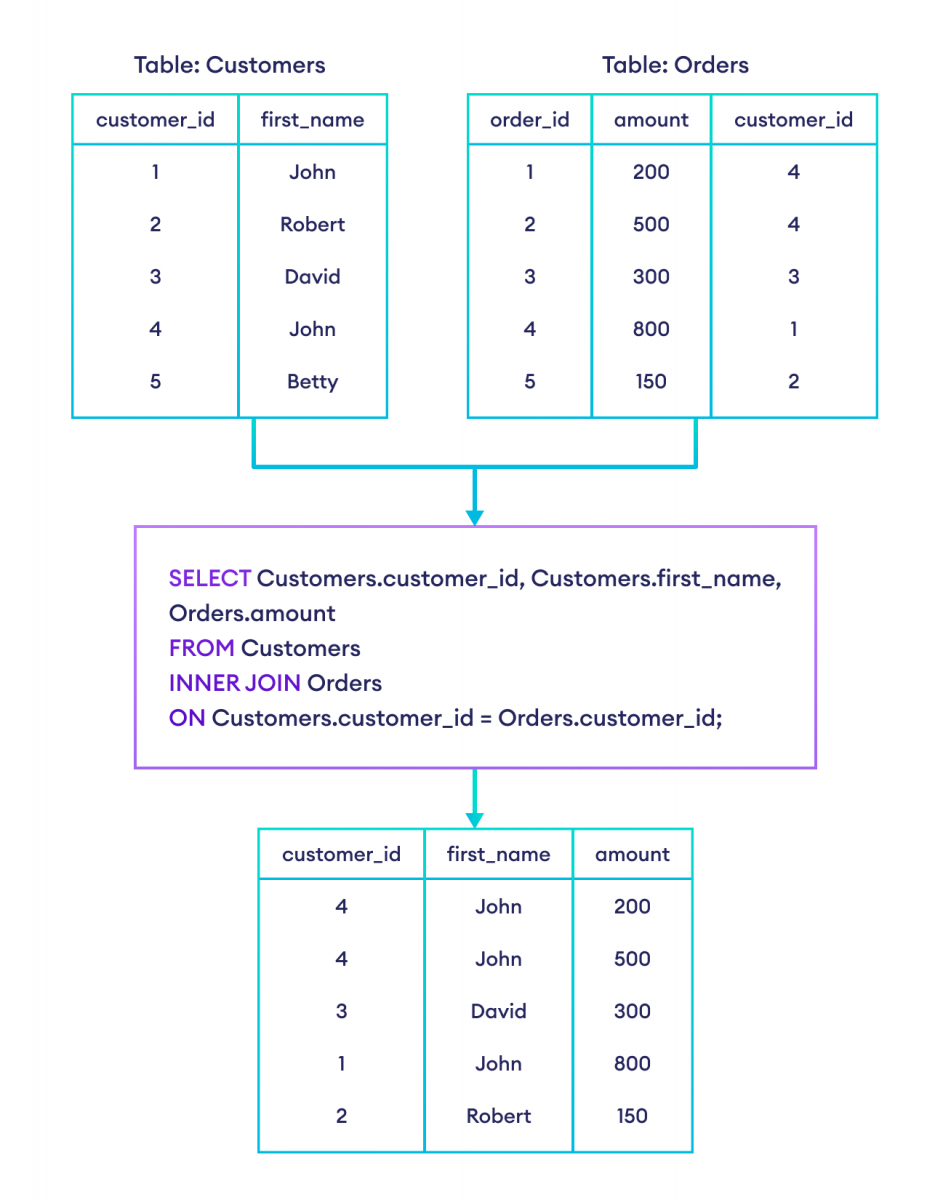
employees departments ┌────────┐ ┌─────────────┐ │ Alice │────────▶│ IT │ ✅ Match │ Bob │────────▶│ HR │ ✅ Match │ Carol │────────▶│ Finance │ ✅ Match │ David │ ✗ │ │ ❌ No dept → excluded │ Eve │────────▶│ IT │ ✅ Match └────────┘ │ Marketing │ ❌ No employee → excluded └─────────────┘SELECT e.name, d.dept_nameFROM employees eINNER JOIN departments d ON e.dept_id = d.id;Result:
┌────────┬─────────────┐│ name │ dept_name │├────────┼─────────────┤│ Alice │ IT ││ Bob │ HR ││ Carol │ Finance ││ Eve │ IT │└────────┴─────────────┘David and Marketing are excluded — no match found🔹 LEFT JOIN — All left rows + matched right rows
Section titled “🔹 LEFT JOIN — All left rows + matched right rows”Returns all rows from the LEFT table. If no match in right → fills with NULL.
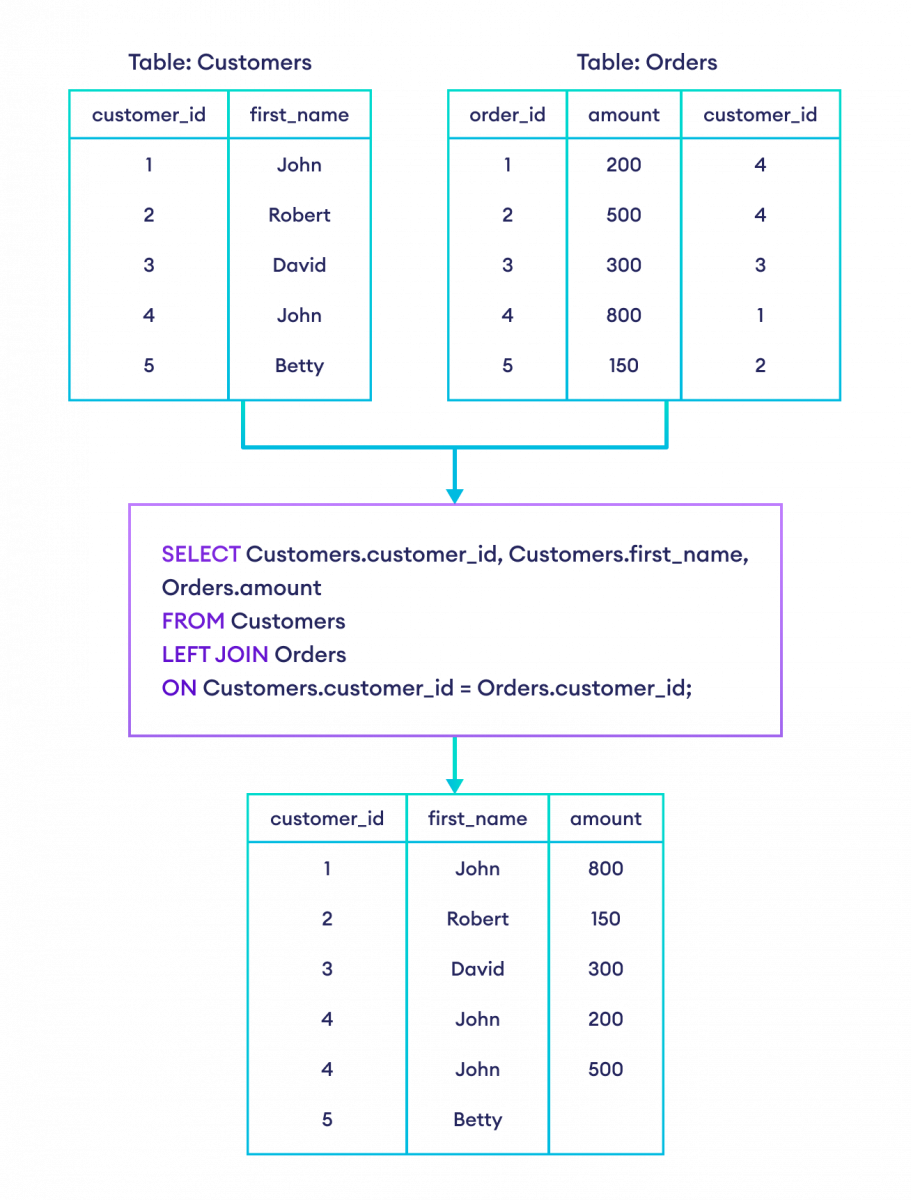
employees (LEFT) departments (RIGHT) ┌────────┐ ┌─────────────┐ │ Alice │─────────▶│ IT │ ✅ Match │ Bob │─────────▶│ HR │ ✅ Match │ Carol │─────────▶│ Finance │ ✅ Match │ David │────✗────▶│ NULL │ ⚠️ No match → NULL │ Eve │─────────▶│ IT │ ✅ Match └────────┘ └─────────────┘ All 5 employees appear. Marketing is ignored.SELECT e.name, d.dept_nameFROM employees eLEFT JOIN departments d ON e.dept_id = d.id;Result:
┌────────┬─────────────┐│ name │ dept_name │├────────┼─────────────┤│ Alice │ IT ││ Bob │ HR ││ Carol │ Finance ││ David │ NULL │ ← David has no department│ Eve │ IT │└────────┴─────────────┘Practical use — find employees WITHOUT a department:
SELECT e.nameFROM employees eLEFT JOIN departments d ON e.dept_id = d.idWHERE d.id IS NULL;-- Result: David🔹 RIGHT JOIN — All right rows + matched left rows
Section titled “🔹 RIGHT JOIN — All right rows + matched left rows”Returns all rows from the RIGHT table. If no match in left → fills with NULL.
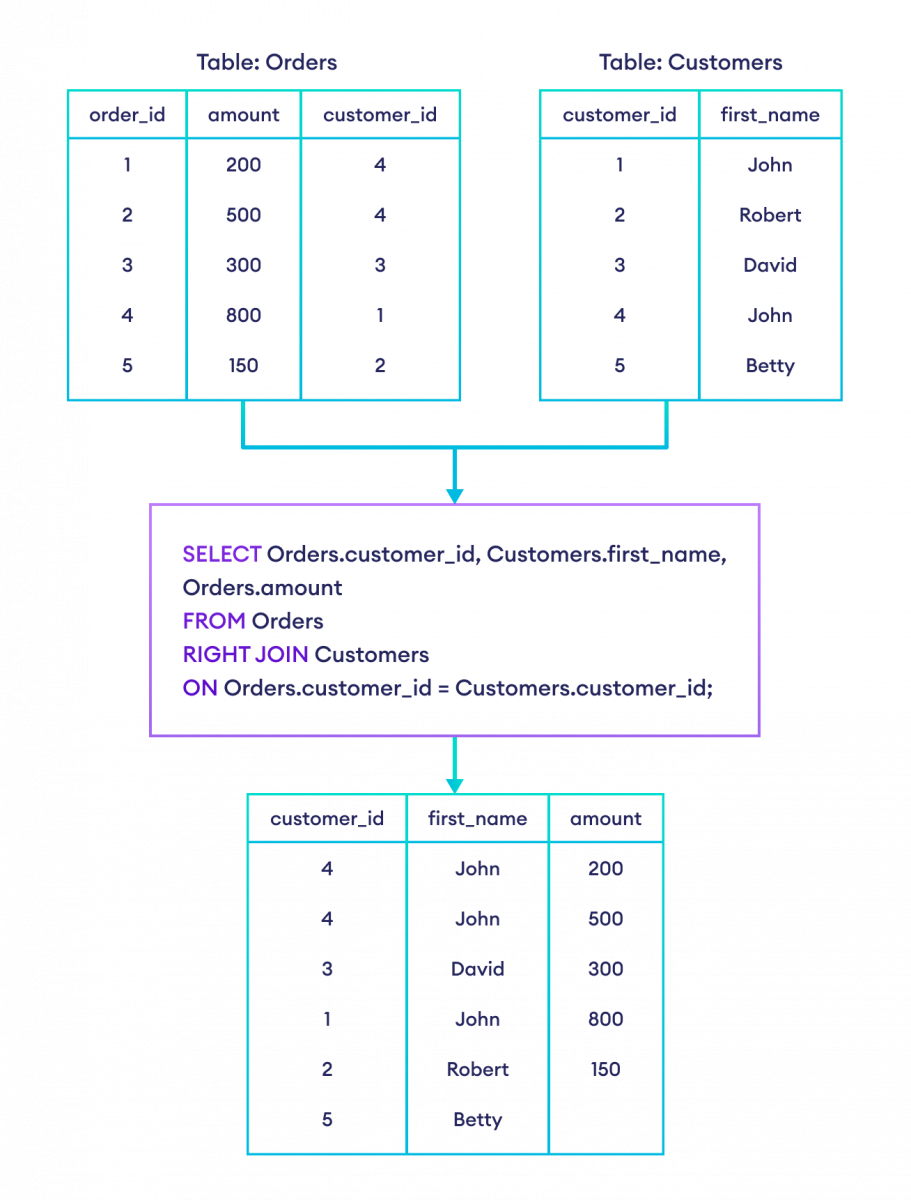
employees (LEFT) departments (RIGHT) ┌────────┐ ┌─────────────┐ │ Alice │─────────▶│ IT │ ✅ Match │ Bob │─────────▶│ HR │ ✅ Match │ Carol │─────────▶│ Finance │ ✅ Match │ NULL │◀────✗────│ Marketing │ ⚠️ No employee → NULL └────────┘ └─────────────┘ All 4 departments appear. David is ignored.SELECT e.name, d.dept_nameFROM employees eRIGHT JOIN departments d ON e.dept_id = d.id;Result:
┌────────┬─────────────┐│ name │ dept_name │├────────┼─────────────┤│ Alice │ IT ││ Bob │ HR ││ Carol │ Finance ││ NULL │ Marketing │ ← Department with no employees└────────┴─────────────┘Practical use — find departments with NO employees:
SELECT d.dept_nameFROM employees eRIGHT JOIN departments d ON e.dept_id = d.idWHERE e.id IS NULL;-- Result: Marketing🔹 FULL OUTER JOIN — All rows from BOTH tables
Section titled “🔹 FULL OUTER JOIN — All rows from BOTH tables”Returns every row from both tables. Missing matches get NULL on the corresponding side. ⚠️ MySQL does NOT support
FULL OUTER JOIN— simulate withUNION.
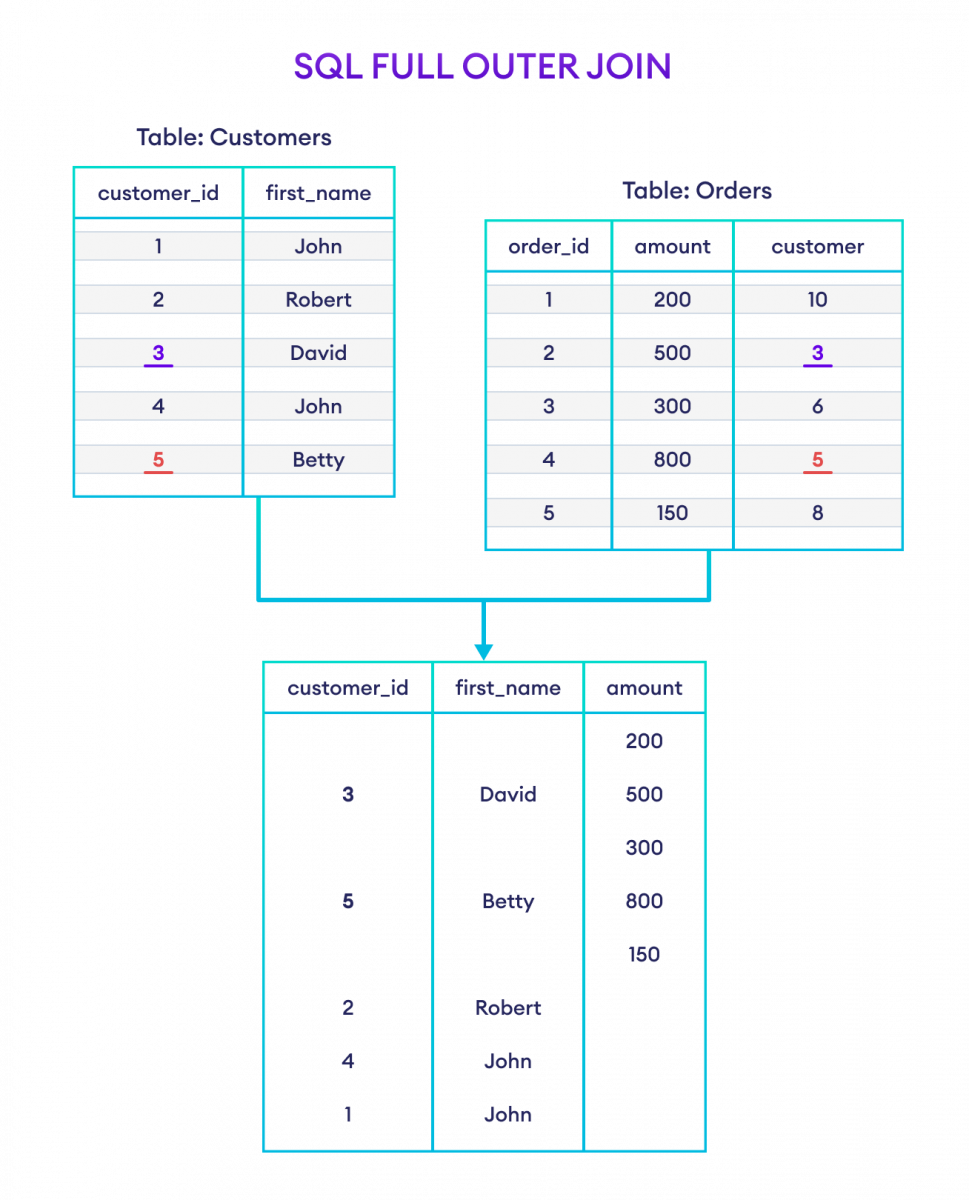
-- MySQL workaroundSELECT e.name, d.dept_nameFROM employees eLEFT JOIN departments d ON e.dept_id = d.id
UNION
SELECT e.name, d.dept_nameFROM employees eRIGHT JOIN departments d ON e.dept_id = d.id;
Result:
┌────────┬─────────────┐│ name │ dept_name │├────────┼─────────────┤│ Alice │ IT ││ Bob │ HR ││ Carol │ Finance ││ David │ NULL │ ← employee with no dept│ Eve │ IT ││ NULL │ Marketing │ ← dept with no employee└────────┴─────────────┘🔹 CROSS JOIN — Every combination (Cartesian Product)
Section titled “🔹 CROSS JOIN — Every combination (Cartesian Product)”Returns every row of A paired with every row of B. No ON condition needed.
SELECT e.name, d.dept_nameFROM employees eCROSS JOIN departments d;5 employees × 4 departments = 20 rows total
Alice - IT Bob - ITAlice - HR Bob - HRAlice - Finance ...and so onAlice - Marketing💡 Useful for generating all possible combinations or test data.
🔹 SELF JOIN — A table joined with itself
Section titled “🔹 SELF JOIN — A table joined with itself”Used when a table has an internal relationship (e.g., employee–manager, category–subcategory).
employees (with manager_id)┌────┬────────┬────────────┐│ id │ name │ manager_id │├────┼────────┼────────────┤│ 1 │ Alice │ NULL │ ← CEO, no manager│ 2 │ Bob │ 1 │ ← reports to Alice│ 3 │ Carol │ 1 │ ← reports to Alice│ 4 │ David │ 2 │ ← reports to Bob└────┴────────┴────────────┘SELECT e.name AS employee, m.name AS managerFROM employees eLEFT JOIN employees m ON e.manager_id = m.id;Result:
┌──────────┬─────────┐│ employee │ manager │├──────────┼─────────┤│ Alice │ NULL ││ Bob │ Alice ││ Carol │ Alice ││ David │ Bob │└──────────┴─────────┘📊 JOIN Types — Visual Overview
Section titled “📊 JOIN Types — Visual Overview”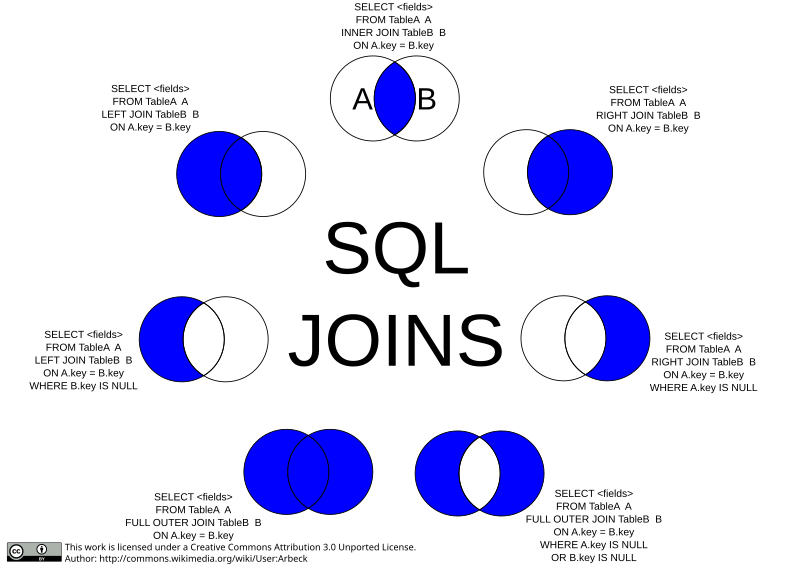
| JOIN Type | Returns | Missing rows become |
|---|---|---|
INNER JOIN | Matched rows only | Excluded |
LEFT JOIN | All left + matched right | NULL on right side |
RIGHT JOIN | All right + matched left | NULL on left side |
FULL OUTER JOIN | All rows from both | NULL on both sides |
CROSS JOIN | All A × B combinations | N/A |
SELF JOIN | Table joined to itself | Depends on join type |
🔹 Multiple JOINs (3+ tables)
Section titled “🔹 Multiple JOINs (3+ tables)”-- employees → departments → locationsSELECT e.name, d.dept_name, l.cityFROM employees eINNER JOIN departments d ON e.dept_id = d.idINNER JOIN locations l ON d.location_id = l.id;💡 Each JOIN adds one more table. Just chain them one after another.
🔹 JOIN with GROUP BY + HAVING + ORDER BY
Section titled “🔹 JOIN with GROUP BY + HAVING + ORDER BY”SELECT d.dept_name, COUNT(e.id) AS total_employees, AVG(e.salary) AS avg_salaryFROM employees eINNER JOIN departments d ON e.dept_id = d.idWHERE e.salary > 30000GROUP BY d.dept_nameHAVING COUNT(e.id) > 1ORDER BY avg_salary DESC;11. 📦 Aggregate Functions + GROUP BY + HAVING
Section titled “11. 📦 Aggregate Functions + GROUP BY + HAVING”SELECT department, COUNT(*) AS total, SUM(salary) AS total_salary, AVG(salary) AS avg_salary, MAX(salary) AS highest, MIN(salary) AS lowestFROM employeesGROUP BY department;WHERE vs HAVING
Section titled “WHERE vs HAVING”WHERE → filters ROWS (before grouping)HAVING → filters GROUPS (after grouping)-- ✅ Correct usageSELECT department, COUNT(*) FROM employeesWHERE salary > 30000 -- filter rows BEFORE groupingGROUP BY departmentHAVING COUNT(*) > 2; -- filter groups AFTER grouping
-- ❌ Wrong — can't use aggregate in WHERESELECT department FROM employeesWHERE COUNT(*) > 2 -- ERROR!GROUP BY department;12. 🪟 Subqueries
Section titled “12. 🪟 Subqueries”A query inside another query.
-- Employees earning above averageSELECT name, salary FROM employeesWHERE salary > (SELECT AVG(salary) FROM employees);
-- Using IN with subquerySELECT name FROM employeesWHERE dept_id IN (  SELECT id FROM departments WHERE dept_name IN ('IT', 'Finance'));
-- Correlated subquery — runs once per outer rowSELECT e.name, e.salaryFROM employees eWHERE e.salary = (  SELECT MAX(salary) FROM employees  WHERE department = e.department);
Subquery vs JOIN — which is better?
Section titled “Subquery vs JOIN — which is better?”-- Subquery (readable but can be slower)SELECT name FROM employeesWHERE dept_id IN (SELECT id FROM departments WHERE dept_name = 'IT');
-- JOIN (preferred — usually faster)SELECT e.name FROM employees eINNER JOIN departments d ON e.dept_id = d.idWHERE d.dept_name = 'IT';13. 🏎️ Indexes
Section titled “13. 🏎️ Indexes”An index is like a book’s table of contents — finds rows fast without scanning everything.
Without Index: With Index:Scan all 1M rows → Jump directly to matching rows 🐢 slow 🚀 fast-- Create indexCREATE INDEX idx_dept ON employees(department);
-- Unique index (also enforces uniqueness)CREATE UNIQUE INDEX idx_email ON employees(email);
-- Composite index (covers two columns — useful for multi-column WHERE)CREATE INDEX idx_dept_salary ON employees(department, salary);
-- Show all indexes on a tableSHOW INDEX FROM employees;
-- Remove an indexDROP INDEX idx_dept ON employees;
-- Check if your query uses the indexEXPLAIN SELECT * FROM employees WHERE department = 'IT';Use indexes on: columns in WHERE, JOIN ON, ORDER BY, GROUP BY
Avoid indexes on: low-cardinality columns (gender), tables with heavy writes
14. 🔄 Normalization
Section titled “14. 🔄 Normalization”Organizing tables to reduce duplicate data and improve integrity.
1NF — Each cell has a single (atomic) value
Section titled “1NF — Each cell has a single (atomic) value”❌ Not 1NF ✅ 1NF┌────┬────────┬──────────────┐ ┌────┬────────┬──────────┐│ id │ name │ phones │ │ id │ name │ phone │├────┼────────┼──────────────┤ ├────┼────────┼──────────┤│ 1 │ Alice │ 111, 222 │ → │ 1 │ Alice │ 111 │└────┴────────┴──────────────┘ │ 1 │ Alice │ 222 │Multiple values in one cell ❌ └────┴────────┴──────────┘2NF — No partial dependency on composite key
Section titled “2NF — No partial dependency on composite key”✅ Fix: Split into:students(student_id, student_name)enrollments(student_id, course_id, grade)3NF — No transitive dependency
Section titled “3NF — No transitive dependency”❌ dept_name depends on dept_id, not on employee id
✅ Fix: Split into:employees(id, name, dept_id)departments(dept_id, dept_name)15. ⚡ Stored Procedures & Functions
Section titled “15. ⚡ Stored Procedures & Functions”Stored Procedure
Section titled “Stored Procedure”DELIMITER //CREATE PROCEDURE GetEmployeesByDept(IN dept_name VARCHAR(50))BEGIN SELECT id, name, salary FROM employees WHERE department = dept_name ORDER BY salary DESC;END //DELIMITER ;
CALL GetEmployeesByDept('IT');Procedure with OUT parameter
Section titled “Procedure with OUT parameter”DELIMITER //CREATE PROCEDURE GetDeptStats( IN dept VARCHAR(50), OUT avg_sal DECIMAL(10,2), OUT max_sal DECIMAL(10,2))BEGIN SELECT AVG(salary), MAX(salary) INTO avg_sal, max_sal FROM employees WHERE department = dept;END //DELIMITER ;
CALL GetDeptStats('IT', @avg, @max);SELECT @avg, @max;Stored Function (returns a single value)
Section titled “Stored Function (returns a single value)”DELIMITER //CREATE FUNCTION CalculateTax(salary DECIMAL(10,2))RETURNS DECIMAL(10,2)DETERMINISTICBEGIN DECLARE tax DECIMAL(10,2); IF salary > 100000 THEN SET tax = salary * 0.30; ELSEIF salary > 50000 THEN SET tax = salary * 0.20; ELSE SET tax = salary * 0.10; END IF; RETURN tax;END //DELIMITER ;
SELECT name, salary, CalculateTax(salary) AS tax FROM employees;| Stored Procedure | Stored Function | |
|---|---|---|
| Called with | CALL | Inside SELECT |
| Returns | Nothing / OUT params | Single value |
| Use in SELECT | ❌ | ✅ |
16. 🔔 Triggers
Section titled “16. 🔔 Triggers”Auto-execute SQL before/after INSERT, UPDATE, or DELETE.
CREATE TRIGGER log_salary_changeAFTER UPDATE ON employeesFOR EACH ROWBEGIN IF OLD.salary <> NEW.salary THEN INSERT INTO salary_audit (emp_id, old_salary, new_salary, changed_at) VALUES (OLD.id, OLD.salary, NEW.salary, NOW()); END IF;END;UPDATE employees SET salary = 90000 WHERE id = 1; ↓ Trigger fires automatically ↓ Row inserted into salary_audit table| Timing | Event | Use case |
|---|---|---|
| BEFORE INSERT | Before adding a row | Validate/transform data |
| AFTER INSERT | After adding a row | Log new records |
| BEFORE UPDATE | Before changing a row | Validate changes |
| AFTER UPDATE | After changing a row | Audit trail |
| BEFORE DELETE | Before removing a row | Prevent unauthorized delete |
| AFTER DELETE | After removing a row | Archive deleted rows |
💡
OLD= values before change,NEW= values after change
17. 🪞 Views
Section titled “17. 🪞 Views”A virtual table — saved SELECT query, no data stored.
-- Create a viewCREATE VIEW it_team ASSELECT id, name, salaryFROM employeesWHERE department = 'IT';
-- Use like a real tableSELECT * FROM it_team;SELECT name FROM it_team WHERE salary > 70000;
-- Update view definitionCREATE OR REPLACE VIEW it_team ASSELECT id, name, salary, emailFROM employees WHERE department = 'IT';
-- Remove a viewDROP VIEW it_team;
Why use views?
- Simplify complex queries — write the JOIN once, reuse everywhere
- Security — expose only specific columns to certain users
- Consistent logic — all queries use the same filter
18. 🔐 ACID Properties
Section titled “18. 🔐 ACID Properties”| Property | Meaning | Example |
|---|---|---|
| Atomicity | All operations succeed or none do | Bank transfer: both deduct + add must succeed |
| Consistency | DB stays in a valid state | Total money before = total money after transfer |
| Isolation | Transactions don’t see each other’s partial changes | Two users booking the last ticket don’t interfere |
| Durability | Committed data survives crashes | After COMMIT, power cut won’t lose the data |
-- ACID in actionSTART TRANSACTION; UPDATE accounts SET balance = balance - 500 WHERE id = 1; UPDATE accounts SET balance = balance + 500 WHERE id = 2;COMMIT; -- Durability: this is now permanently saved -- Atomicity: both lines run or neither does19. 🧮 Window Functions (Advanced)
Section titled “19. 🧮 Window Functions (Advanced)”Perform calculations across related rows without collapsing them.
SELECT name, department, salary, ROW_NUMBER() OVER (PARTITION BY department ORDER BY salary DESC) AS row_num, RANK() OVER (PARTITION BY department ORDER BY salary DESC) AS rank, DENSE_RANK() OVER (PARTITION BY department ORDER BY salary DESC) AS dense_rank, SUM(salary) OVER (PARTITION BY department) AS dept_total, LAG(salary) OVER (ORDER BY salary) AS prev_salary, LEAD(salary) OVER (ORDER BY salary) AS next_salaryFROM employees;ROW_NUMBER vs RANK vs DENSE_RANK
Section titled “ROW_NUMBER vs RANK vs DENSE_RANK”Salaries: 90000, 80000, 80000, 70000
ROW_NUMBER: 1, 2, 3, 4 ← always unique, no tiesRANK: 1, 2, 2, 4 ← tie gets same rank, then gapDENSE_RANK: 1, 2, 2, 3 ← tie gets same rank, no gap20. ⚠️ DELETE vs TRUNCATE vs DROP
Section titled “20. ⚠️ DELETE vs TRUNCATE vs DROP”| Feature | DELETE | TRUNCATE | DROP |
|---|---|---|---|
| Removes | Selected rows | All rows | Entire table |
WHERE clause | ✅ Yes | ❌ No | ❌ No |
| Can ROLLBACK | ✅ Yes | ❌ No | ❌ No |
| Resets AUTO_INCREMENT | ❌ No | ✅ Yes | ✅ Yes |
| Fires triggers | ✅ Yes | ❌ No | ❌ No |
| Speed | Slow (logs each row) | Fast | Fast |
| Table structure kept | ✅ Yes | ✅ Yes | ❌ No |
DELETE FROM employees WHERE id = 5; -- remove one rowTRUNCATE TABLE employees; -- wipe all rows fastDROP TABLE employees; -- destroy the entire table21. 📋 Common Interview Questions
Section titled “21. 📋 Common Interview Questions”Q1: Difference between CHAR and VARCHAR?
CHAR(10)    → always stores 10 bytes (padded with spaces)VARCHAR(10) → stores only what's needed (1–10 bytes)
Use CHAR for fixed: 'US', 'IN' (country codes)Use VARCHAR for variable: names, emails
Q2: Find the 2nd highest salary
-- Method 1: SubquerySELECT MAX(salary) FROM employeesWHERE salary < (SELECT MAX(salary) FROM employees);
-- Method 2: LIMIT + OFFSETSELECT DISTINCT salary FROM employeesORDER BY salary DESC LIMIT 1 OFFSET 1;
-- Method 3: DENSE_RANK (works for Nth too)SELECT salary FROM (  SELECT salary, DENSE_RANK() OVER (ORDER BY salary DESC) AS rnk  FROM employees) t WHERE rnk = 2;
Q3: UNION vs UNION ALL?
UNION -- removes duplicate rows (slower)UNION ALL -- keeps all rows including duplicates (faster)Q4: What is a deadlock?
Transaction 1: locks Row A → waits for Row BTransaction 2: locks Row B → waits for Row A→ Deadlock! MySQL detects and rolls back one automatically.Q5: N+1 query problem?
-- ❌ N+1: 1 query to get 100 orders + 100 queries for usersSELECT * FROM orders;SELECT * FROM users WHERE id = ?;  -- runs 100 times
-- ✅ Fix: use JOINSELECT o.*, u.name FROM orders oJOIN users u ON o.user_id = u.id;
Q6: NOW() vs CURDATE()?
NOW() -- 2024-04-06 14:30:00CURDATE() -- 2024-04-06CURTIME() -- 14:30:0022. 🚀 Query Optimization Tips
Section titled “22. 🚀 Query Optimization Tips”-- Use EXPLAIN to analyze a queryEXPLAIN SELECT * FROM employees WHERE department = 'IT';-- Look at "key" column — if populated, index is being used ✅
-- Avoid SELECT * — fetch only needed columnsSELECT name, salary FROM employees;
-- Avoid functions on indexed columns in WHERE-- ❌ Slow — index on hired_at can't be usedWHERE YEAR(hired_at) = 2023
-- ✅ Fast — range query CAN use the indexWHERE hired_at BETWEEN '2023-01-01' AND '2023-12-31'
-- Use LIMIT for paginationSELECT * FROM employees ORDER BY id LIMIT 20 OFFSET 0; -- page 1SELECT * FROM employees ORDER BY id LIMIT 20 OFFSET 20; -- page 2
-- Prefer JOIN over subquery when possible📌 Quick Cheat Sheet
Section titled “📌 Quick Cheat Sheet”SHOW DATABASES; -- list all DBsUSE company_db; -- switch DBSHOW TABLES; -- list tablesDESCRIBE employees; -- show table structure
-- Find duplicatesSELECT email, COUNT(*) FROM usersGROUP BY email HAVING COUNT(*) > 1;
-- Delete duplicates, keep oneDELETE FROM users WHERE id NOT IN ( SELECT MIN(id) FROM users GROUP BY email);
-- PaginationSELECT * FROM employees LIMIT 10 OFFSET 20;
-- Current date/timeSELECT NOW(), CURDATE(), CURTIME();💪 Good luck with your interview!
Top focus areas: JOINs · Indexes · ACID · Window Functions · Normalization
Practice writing queries from scratch — interviewers love that more than memorized answers.