
LEFT JOIN (LEFT OUTER JOIN)
2. LEFT JOIN (LEFT OUTER JOIN)
Section titled “2. LEFT JOIN (LEFT OUTER JOIN)”What it does
Section titled “What it does”Returns all rows from the left table, plus matching rows from the right table. Where there is no match on the right side, columns from the right table are filled with NULL.
The left table is never filtered. It is the “anchor.”
Visual Diagram
Section titled “Visual Diagram”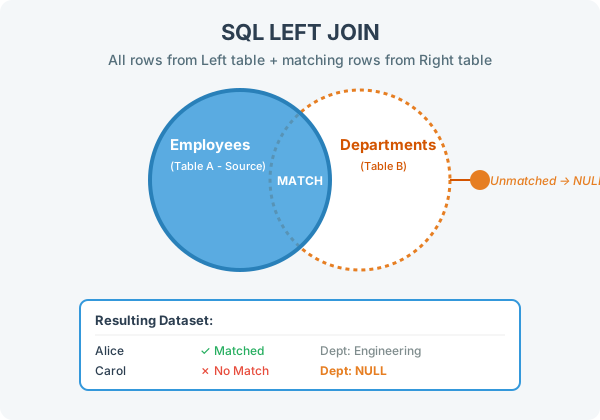
SELECT e.name, d.dept_nameFROM employees eLEFT JOIN departments d ON e.dept_id = d.dept_id;Result
Section titled “Result”| name | dept_name |
|---|---|
| Alice | Engineering |
| Bob | Marketing |
| Carol | NULL |
| David | NULL |
Key observations
Section titled “Key observations”- Carol and David appear because they are in the left table (employees), even though their
dept_idhas no match in departments. - Finance does not appear because it exists only in the right table.
NULLindept_nametells you “this employee has no valid department.”
When to use LEFT JOIN
Section titled “When to use LEFT JOIN”This is the most commonly used join in practice. Use it when:
- You want all records from one table, and optionally related data from another.
- You’re checking for missing relationships:
WHERE d.dept_id IS NULLafter a LEFT JOIN finds all employees with no department.