
RIGHT JOIN (RIGHT OUTER JOIN)
3. RIGHT JOIN (RIGHT OUTER JOIN)
Section titled “3. RIGHT JOIN (RIGHT OUTER JOIN)”What it does
Section titled “What it does”The mirror image of LEFT JOIN. Returns all rows from the right table, plus matching rows from the left. Non-matching left-side columns become NULL.
Visual Diagram
Section titled “Visual Diagram”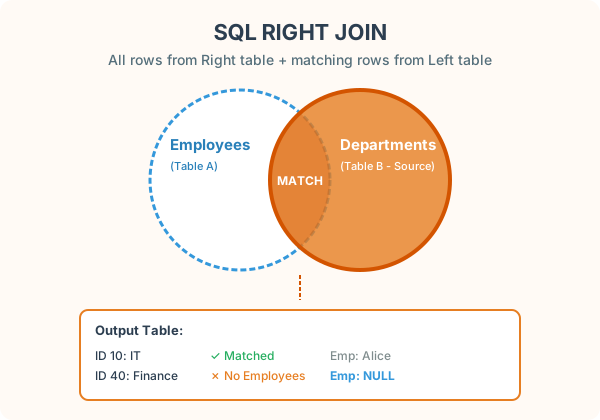
SELECT e.name, d.dept_nameFROM employees eRIGHT JOIN departments d ON e.dept_id = d.dept_id;Result
Section titled “Result”| name | dept_name |
|---|---|
| Alice | Engineering |
| Bob | Marketing |
| NULL | Finance |
Key observations
Section titled “Key observations”- Finance appears even though no employee belongs to it. It is in the right table (departments), so it is always included.
- Carol and David do not appear — they are in the left table and have no match in the right table.
NULLinnamemeans “this department has no assigned employees.”
Practical tip
Section titled “Practical tip”RIGHT JOIN is rarely needed. Any RIGHT JOIN can be rewritten as a LEFT JOIN by swapping the table order:
-- These two queries produce identical results:SELECT e.name, d.dept_nameFROM employees e RIGHT JOIN departments d ON e.dept_id = d.dept_id;
-- Equivalent LEFT JOIN (more readable):SELECT e.name, d.dept_nameFROM departments d LEFT JOIN employees e ON e.dept_id = d.dept_id;